How to integrate a horse racing API into your website
Build a secure horse-racing website integration with RacingAPI.net: backend requests, cached page models, clear UI states, deployment checks and usage controls.
Published 30 Oct 2026Updated 30 Oct 20267 min read
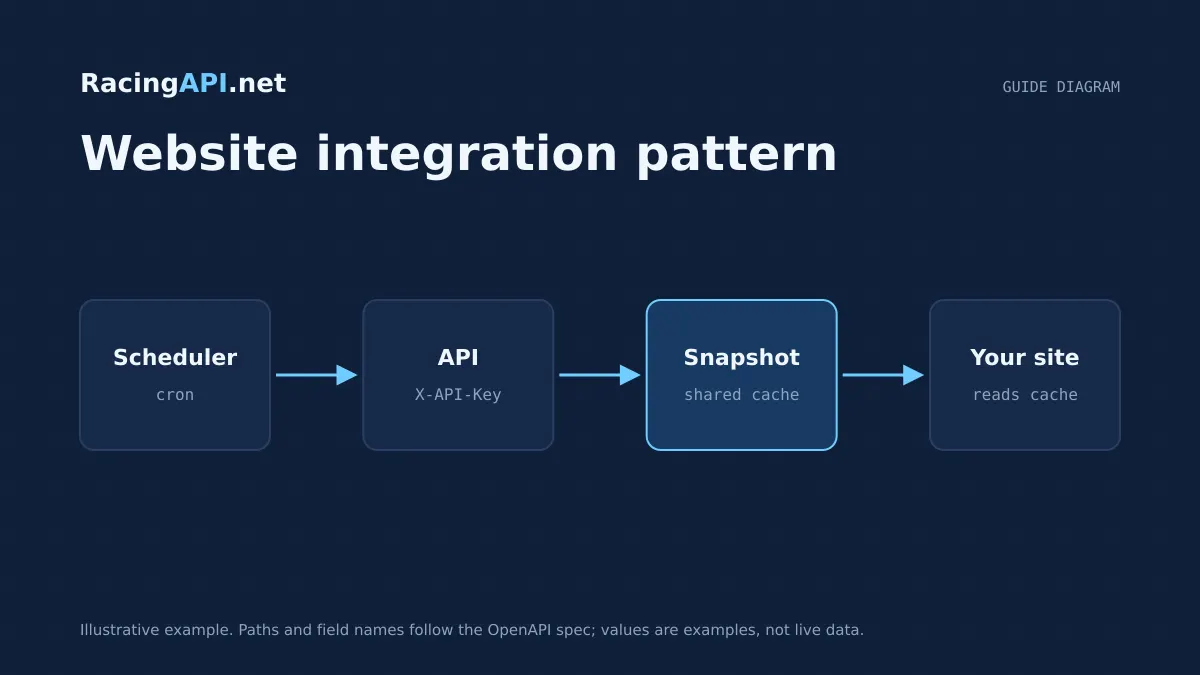
A good horse racing integration starts on the server, not in the browser. With RacingAPI.net, your website calls the API from backend code using your own X-API-Key, then serves a fast page model to the front end. That keeps credentials private, simplifies caching, and lets you show racecards, results, odds, form and weather with a consistent layout.
The key design choice is to treat RacingAPI.net as your data source, not a client-side widget. Build one server-side fetch layer, normalise responses into a page model, cache those responses carefully, and render explicit UI states for loading, stale data, empty feeds and rate limits. That approach works cleanly with the UK and Ireland region feed and avoids unnecessary refetching on every page load.
Try the documented request
Start with the combined UK and Ireland racecards. Reuse returned IDs and the selected feed date for related race, result, odds and runner requests.
# Set RACINGAPI_KEY on your server; use IDs returned by the feed.
# FEED_DATE must be YYYY-MM-DD in the feed context you want.
curl --fail-with-body --max-time 15 --get \
  "https://racingapi.net/v1/racecards" \
  -H "X-API-Key: ${RACINGAPI_KEY}" \
  --data-urlencode "region=uk" \
  --data-urlencode "date=${FEED_DATE}" \
  -H "Accept: application/json"
Run this on your server, not in public browser code. Replace the environment variables before running it. Respect the response cache headers and Retry-After; do not retry failed requests without a limit.
Start with a server-side contract
Use RacingAPI.net from your backend only. Each request should go to https://racingapi.net with your X-API-Key header, and the key should stay server side. Do not embed it in JavaScript shipped to the browser, and do not share the key between unrelated sites or developers. If your product has multiple environments, issue separate keys or secret values for local, staging and production so you can rotate them without breaking a live site.
Choose the narrowest region and endpoint set that matches your page. For horse racing websites, region=uk covers both the UK and Ireland in a single feed, so you do not need a separate Ireland region code. If you are building a racecard page, start with the racecards endpoint; if you need a specific race page, call race details by id; if you need betting prices or weather, fetch those separately so your page can degrade gracefully when one feed changes.
- Keep the API key in environment variables or a secret manager.
- Make all API calls from a trusted backend process.
- Use region=uk for combined UK and Irish coverage.
- Map each page type to the smallest endpoint set that satisfies it.
Cache deliberately and safely
Caching matters because race pages are often revisited, filtered and refreshed. Cache API responses on your server so you avoid refetching the same page model for every visitor. The safest pattern is to cache the normalised backend response, not the user-specific HTML. That reduces repeat work while keeping the front end focused on presentation rather than data retrieval.
Be careful with shared caches if any page contains personalisation or account-specific messaging. MDN guidance is clear that personalised information must not leak through shared caches. If a page includes user-specific content, keep that part private or vary it appropriately. For race data itself, a shared cached page model is usually fine because the racing feed is the same for all visitors, but you should still separate cache entries by region, endpoint, id and date so one race does not overwrite another.
- Cache the backend page model, not personalised HTML.
- Key caches by endpoint, region, race id and date where relevant.
- Keep private user content out of shared cache layers.
- Use cache expiry that matches your own refresh strategy, not a made-up live guarantee.
Design explicit UI states for the feed lifecycle
A racing site should make feed status visible instead of hiding it behind spinners. Build clear states for loading, fresh, stale, partial, empty and rate-limited data. Loading should appear only while the backend is waiting for RacingAPI.net; stale should mean you are showing cached content while a background refresh runs; partial should mean some sections loaded correctly and others did not. This gives visitors confidence that the site is working even when one endpoint is slower or temporarily unavailable.
Rate limiting needs a specific state too. RacingAPI.net uses per-second and monthly request limits that depend on plan, and excess requests return HTTP 429 with Retry-After. Your backend should read that response, back off, and avoid hammering the API. On the front end, show the last cached page model if you have one, then note that prices or results are temporarily paused rather than repeatedly retrying from the browser.
- Loading: no cached page model yet.
- Fresh: recently fetched and fully rendered.
- Stale: visible cached data while refresh runs.
- Partial: some endpoint blocks failed but the page is still useful.
- Rate-limited: honour Retry-After and stop aggressive retries.
Check deployment, access and quota handling
Before launch, verify that your production environment has the correct secret, that the backend can reach https://racingapi.net, and that your page can render without the browser making any direct API calls. Test the full journey: fetch racecards, open a race detail page, confirm form blocks, and check that odds or weather blocks degrade cleanly if the upstream response is missing or incomplete. Also confirm that your trial or subscription is active, because API access requires completed card-based trial checkout or an active paid plan; signup alone is not enough.
Track usage centrally across your keys because monthly quota is aggregated. The billing month resets on the first day of each calendar month in UTC, and changing plans does not reset usage. Build an internal counter or dashboard log so you can spot bursts before they hit a limit. If you offer team access inside your own organisation, keep the account and keys under your control; customer resale, sublicensing or sharing the integration with unrelated developers is not allowed.
- Confirm backend-only access in production.
- Test the subscription or trial state before go-live.
- Monitor request volume across all keys together.
- Do not expose, resell or share your RacingAPI.net access.
Deploy with rollback in mind
A racing site is most reliable when deployment changes are reversible. Ship the integration behind a feature flag or route-level switch so you can fall back to cached pages if needed. Keep the server code that maps RacingAPI.net responses separate from your presentation layer, and version your page model so front-end changes do not break old templates. That separation is useful when you add a new page type, such as weather alongside racecards, because the same backend contract can serve both existing and new screens.
After deployment, inspect the first live requests and confirm that the expected region, ids and dates are being sent. Check that odds are preserved exactly as received, that weather attribution is displayed where required, and that no client-side bundle contains the secret header. If you are displaying race selections or other insight blocks on Enterprise, keep them clearly labelled as AI-assisted and avoid presenting them as guaranteed outcomes.
- Use a feature flag or controlled rollout.
- Keep data mapping isolated from templates.
- Version your page model when the layout changes.
- Verify no secret or upstream header reaches the browser.
Key takeaways
- Keep RacingAPI.net calls server side, with X-API-Key stored as a secret and never exposed in the browser.
- Build one shared page model, then cache it carefully and render explicit states for loading, stale, partial and rate-limited data.
- Check deployment for active access, monthly quota tracking, and no resale or account sharing before you go live.
Integration checklist
0/10 completeFrequently asked questions
Should I call RacingAPI.net from the browser or my server?
Call it from your server. The X-API-Key must stay server side, and the browser should receive only your own rendered page or a cached page model. That prevents secret leakage, gives you one place to manage quotas, and makes it easier to cache racecards, results and odds consistently.
How should I cache racing data on a website?
Cache the normalised backend response rather than personalised HTML. Separate cache entries by region, endpoint, race id and date where relevant, and avoid putting user-specific content into shared caches. That keeps race pages fast without risking one visitor seeing another visitor’s private state.
What happens if RacingAPI.net returns HTTP 429?
Your backend should stop retrying immediately and honour the Retry-After header. Show a graceful fallback such as the last cached page model, then refresh later. Do not let the browser hammer the endpoint with repeated reloads, because monthly usage and per-second limits apply across your keys.
Can I resell access to my integration inside my own product?
No. Your RacingAPI.net access is for your own-site display use. You should not resell API access, share your account with other developers or expose the service as a general-purpose feed to third parties. Keep ownership and secret management inside your organisation.
Sources and references
External references for background only; they do not endorse RacingAPI.net.
Related guides
All guides Website guides
Horse racing API for WordPress websites
Build a secure WordPress horse racing integration with server-side API calls, transient caching, escaped output and your own shortcode-driven pages.
 Website guides
How to build a horse racing odds comparison
A practical guide to structuring per-runner odds grids, labelling bookmakers, sorting observed prices, and updating shared snapshots with RacingAPI.net.
 AI & integrations
AI horse racing tips API: selections for your website
Build a website layer around Enterprise saved horse racing selections, with odds, confidence, EV, bet type and two-sentence explanations.