Racecourse weather API: forecasts beside racecards
Use racecourse weather alongside racecards to plan for temperature, rain and wind, while keeping forecast data separate from official going and track reports.
Published 30 Oct 2026Updated 30 Oct 20267 min read
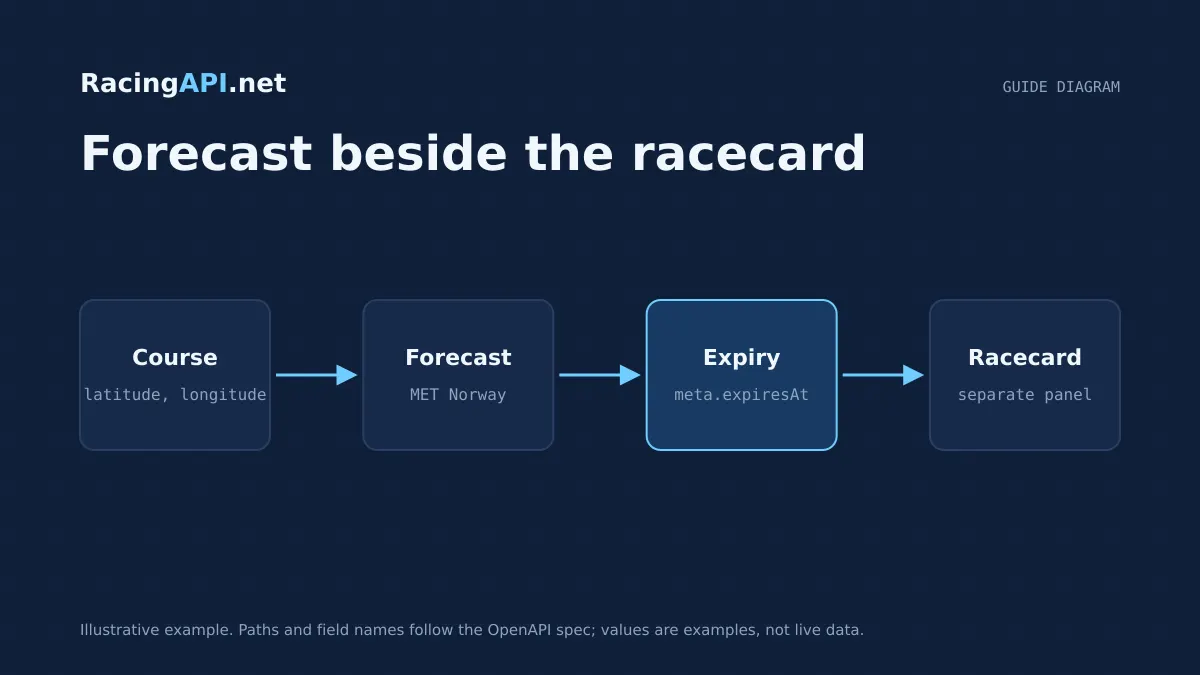
Racecards tell you what is running; racecourse weather tells you what the course is likely to feel like at the time those runners go to post. RacingAPI.net exposes course-location forecasts beside the meeting data, so you can present temperature, rainfall, wind and humidity in the same product flow without conflating them with going or clerk-issued updates.
The important design point is separation. Weather is a forecast for the course location, supplied with model times, valid times and expiry information, plus the required attribution. Official going remains a different signal. If you keep those two layers distinct in your UI and cache logic, you can give users more context without overclaiming precision.
Try the documented request
Get COURSE_ID from the racecard or racecourse list. Weather is a local forecast; going is a separate racing field.
# Set RACINGAPI_KEY on your server; use IDs returned by the feed.
# FEED_DATE must be YYYY-MM-DD in the feed context you want.
curl --fail-with-body --max-time 15 --get \
  "https://racingapi.net/v1/racecourses/${COURSE_ID}/weather" \
  -H "X-API-Key: ${RACINGAPI_KEY}" \
  --data-urlencode "region=uk" \
  --data-urlencode "date=${FEED_DATE}" \
  -H "Accept: application/json"
Run this on your server, not in public browser code. Replace the environment variables before running it. Respect the response cache headers and Retry-After; do not retry failed requests without a limit.
What the racecourse weather feed represents
The racecourse weather endpoint is built around a course location rather than a generic town or postcode. That matters because a racecourse can sit in open ground, on exposed coast, or in a microclimate that differs from the nearest settlement. The feed therefore gives you weather for the course itself, which is the useful unit when you are showing context beside a racecard.
The returned forecast is a model-derived outlook from MET Norway. You should treat it as forecast weather, not as an official statement about the going. That distinction is not cosmetic: users may want to compare a wet outlook with the published going, but they are different inputs with different provenance and update rhythms.
In practice, the feed is most useful when displayed alongside meeting cards, surface notes, and time-to-off. A user scanning a card can see that a race is due in lighter rain or stronger wind, then decide whether that context matters for pace, draw, or simply comfort at the track.
- Course-location forecast, not a generic area forecast
- Separate from official going and course reports
- Useful beside racecards, race times and meeting summaries
Core fields to surface in your interface
The endpoint returns a JSON envelope: data.course identifies the venue, and data.forecast contains time-indexed forecast entries. Each entry includes temperatureC, precipitationMm, windSpeedMps and humidityPercent where supplied. The attribution is in meta.source. Keep the unit labels visible, especially for rainfall and wind, because the numbers are most useful when readers know exactly what they represent.
Use data.course to anchor the display to the meeting venue. Select the relevant entry from data.forecast by its time, then render a concise summary with temperature, rainfall and wind underneath. The forecast is an array of structured values, not a ready-made paragraph. Retain precipitationPeriodHours beside rainfall so an hourly forecast amount is not confused with a longer accumulation period.
The meta.source field is not decoration. It is part of the legal and technical record for the forecast, and it should stay with the data wherever you surface it. If you store or re-render the forecast later, preserve the source attribution exactly as returned.
- temperatureC: show a Celsius value with a clear unit
- precipitationMm: present predicted rainfall with precipitationPeriodHours
- windSpeedMps: keep the metres-per-second unit visible
- humidityPercent: show as a percentage, not a vague comfort label
- meta.source: retain attribution wherever the forecast appears
How to work with model times, valid times and expiry
Weather is time-sensitive, so your implementation should treat the forecast as a snapshot with a lifecycle. RacingAPI.net includes model times and valid times so you can tell users when the forecast was produced and which period it applies to. That is especially useful on race days, when a morning forecast may still be visible by late afternoon but no longer be the best reference for the current conditions.
Expiry belongs in the same mental model. If the response indicates expiry, use it to decide when to refresh rather than assuming a fixed polling interval. This is better for bandwidth and better for accuracy, because it keeps your interface aligned with the forecast provider’s update window instead of inventing your own cadence.
For client-side rendering, the safest pattern is to cache deliberately and refresh when the response says the data is stale or about to expire. That reduces unnecessary requests while avoiding the common mistake of reusing weather too long in a shared cache. If your application has personalised views, keep those separate so one user’s recently fetched context does not leak into another’s screen.
- Model time tells you when the forecast was generated
- Valid time tells you the period the forecast covers
- Expiry should drive refresh logic, not an arbitrary timer
- Do not reuse stale weather beyond the returned lifecycle
Attribution and caching without breaking the feed
Because the weather data is sourced from MET Norway, attribution is part of the integration, not a footnote. Keep the returned attribution visible wherever the forecast is shown, and do not strip it out in a downstream transformation layer. If you export screenshots, emails or PDFs, the attribution should still travel with the forecast content.
The other essential point is cache discipline. Weather can be cached, but it should be cached deliberately and with respect for the returned expiry and conditional caching signals. RacingAPI.net already mediates the upstream forecast, so your job is to respect that lifecycle rather than trying to bypass it by calling the weather source directly.
This also helps you avoid mixing short-lived forecast state with broader meeting content. A racecard may be reused throughout a day, while weather may need refreshing more often. Keep those cache policies separate so a stable racecard does not make a stale forecast look current.
- Retain source attribution wherever weather appears
- Use expiry and conditional caching signals to refresh safely
- Cache weather separately from racecard metadata
- Do not treat forecast reuse as a substitute for refresh
Weather is context, not official going
A common integration mistake is to treat forecast rain as if it were the same thing as official going. It is not. Forecast weather can help explain why a surface may change, but it cannot replace the official racing surface description, which comes from different operational sources and is subject to its own timing and verification.
That distinction matters in your copy as well as your data model. If a course is forecast to receive rain, say that the forecast suggests rain, not that the going is changing. If wind is strong, present that as a weather condition, not a track assessment. This keeps your product accurate and avoids implying that RacingAPI.net is supplying a surrogate going service.
The best user experience is to show both side by side: the racecard and any current going notes in one place, and the forecast weather in another. Users then get the context they need without having to infer one from the other.
- Forecast rain does not equal official going
- Wind and temperature are weather context, not race surface facts
- Present the two data types side by side, not as replacements
A practical display pattern for race-day products
A straightforward implementation is to load the racecard first, then attach the weather panel at course level. That keeps the main page fast and ensures users see the core race information immediately. Once the weather response arrives, display the course name, the forecast summary and the key measurements in a small, consistent block near the meeting header or beside the race time list.
For race-day apps, timing matters. If you show multiple meetings, each course may have a different weather snapshot and a different expiry. Do not reuse one course’s forecast across another venue simply because both are in the same region feed. The forecast is tied to the location returned by the endpoint, so each course should be handled on its own terms.
If you store weather for later reference, save the retrieval time as well as the returned forecast fields. That gives your team a clear audit trail when users ask why the display changed. In a product that combines card data and weather context, a small amount of explicit bookkeeping prevents a lot of confusion.
- Load racecard content first, weather second
- Treat each course forecast as venue-specific
- Store retrieval time alongside the returned weather snapshot
- Keep the weather panel compact and clearly labelled
Key takeaways
- Racecourse weather in RacingAPI.net is a course-location forecast that should sit beside, not replace, racecard and going information.
- Model times, valid times and expiry are there to keep your display accurate and your cache refreshes intentional.
- Always retain MET Norway attribution and keep weather data separate from official going in both wording and data handling.
Integration checklist
0/10 completeFrequently asked questions
Is the racecourse weather feed the same as official going?
No. The forecast is course-location weather data from MET Norway, while official going is a separate racing input. Use the weather to add context to the card, but do not present it as the official surface description or as a replacement for meeting updates.
What should I do with valid times and expiry?
Use them to decide when the forecast is fresh enough to show and when it should be refreshed. The valid time tells you the forecast period, and the expiry tells you when your cached copy should no longer be treated as current.
Do I need to keep the source attribution in my UI?
Yes. The returned attribution should remain visible wherever the forecast is displayed or republished. Keep it with the weather content, not just in internal logs, so your presentation stays aligned with the upstream licensing and attribution requirements.
Can I share one weather snapshot across several racecards?
Only if those racecards relate to the same course and the forecast is still within its valid window. Weather is venue-specific, so do not reuse a snapshot for a different track or beyond its expiry just to save a request.
Should I show temperature, rain and wind in race terms or weather terms?
Show them as weather terms with clear units. Temperature, precipitation and wind are forecast measurements, not racing abstractions. If you want to add interpretation, do it separately and label it as your own presentation layer.
Sources and references
External references for background only; they do not endorse RacingAPI.net.
Related guides
All guides Racing data
Horse form and statistics API: using supplied records
Learn how to read RacingAPI.net horse form and statistics as supplied daily-feed summaries, with sensible handling of missing values, sample size and regional context.
 Racing data
Horse racing odds API: prices with context
Learn how RacingAPI.net delivers observed horse racing odds with timestamps, price formats, missing-price handling and useful context for own-site comparison.
 Racing data
Horse racing racecards API: building a race-day page
Build a race-day page with meeting, race and runner data, careful declaration handling, and reliable detail fetching from RacingAPI.net.