Horse Racing Racecards API
A practical daily racecards feed for building race lists, meeting pages and runner-led racecard views across the combined UK and Ireland market.
Endpoint
GET/v1/racecards
- Access
- All plans
- Coverage
- UK and Ireland
- Updated
- 1 Nov 2026
- Read
- 7 min
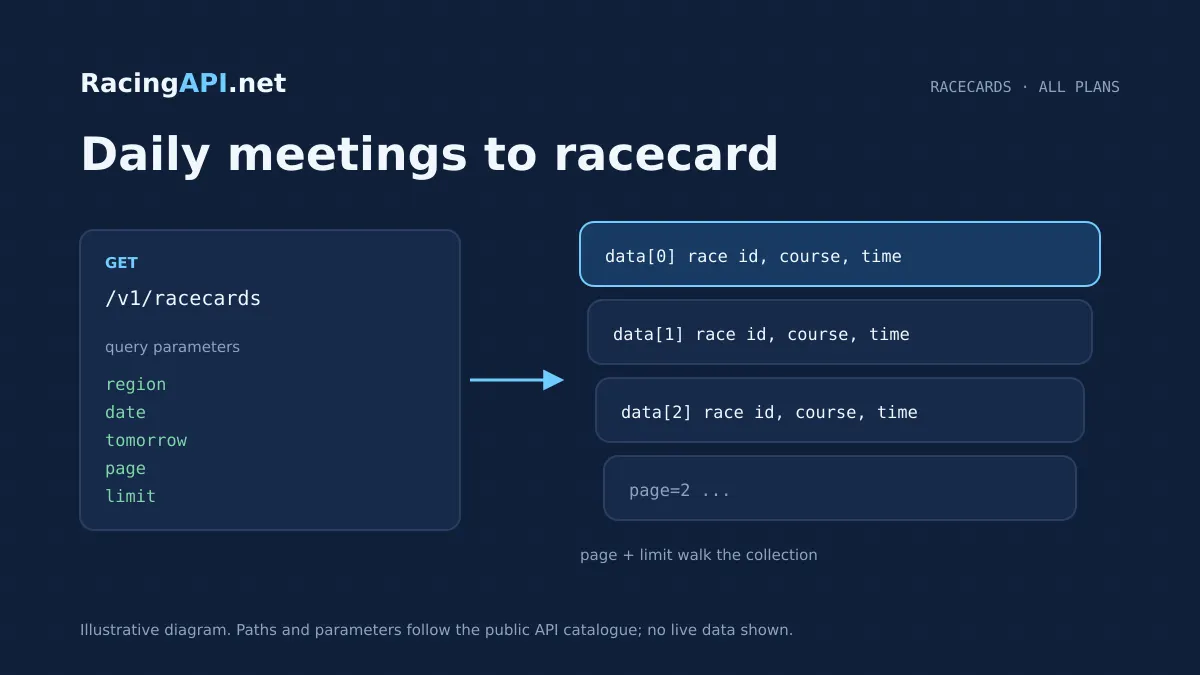
The Horse Racing Racecards API gives you the daily starting point for a racing product: the combined UK and Ireland meeting feed, with races and declared runners ready to display or enrich with related endpoints. It is designed for list discovery rather than a single-race lookup, so you can build a full “today” or “tomorrow” racecard experience without stitching together separate country feeds. The only accepted region is the combined code uk, which includes both UK and Irish meetings in one list.
That makes it a strong fit for racecard pages, meeting hubs, fixtures calendars and “what’s on today” modules. You can filter by date or use the documented tomorrow feed, page through the list, and use the returned race, horse, jockey, trainer and course IDs to move into deeper detail endpoints when a user opens a race or taps through to a runner profile. Time, weight and price strings are preserved exactly as supplied, so the feed stays faithful to what you can show on screen.
What this service gives you
- Start with one daily list feed for UK and Ireland racecards.
- Build clear today/tomorrow racecard views with feed-native IDs.
- Keep runner groups intact while paginating the race list.
What the racecards feed returns
This endpoint returns the daily combined racecard list for the UK and Ireland market, with each race item carrying its nested declared runners. It is a list product, so the unit of retrieval is the race, not the individual runner. That matters when you are designing navigation: users can scroll through meetings and races first, then drill into a selected race or horse using the IDs already present in the feed.
Because the feed is date-aware, it suits a public-facing racecard landing page or editorial calendar where the content changes every day. You can request a specific calendar date in YYYY-MM-DD format, or use the documented tomorrow feed when you want to prebuild the next day’s pages. If there are no races on a non-racing day, an empty list is a valid response and should be handled as normal, not as an error.
- Combined UK and Ireland daily list only
- Race items include nested runners
- Empty list is valid on non-racing days
How to integrate list discovery into your UI
A practical implementation is to treat /v1/racecards as the first screen in your race hub. Fetch the current day on load, render meetings and races as collapsible cards, then keep a secondary route or panel ready for a single-race view from the race detail endpoint. That structure gives you a fast overview page while preserving a clean path into richer race-specific content when the user chooses a race.
The list response is also suitable for search and filter controls on your own site. For example, you can offer date selection, a “tomorrow” toggle and pagination without needing to cache and remix unrelated records. Because the returned IDs come from the feed, you should store and pass them through directly when building linked views, rather than matching on names. That keeps your racecard, horse profile and results flows aligned when names repeat or are presented differently.
- Use as the landing list for today and tomorrow
- Pass feed IDs straight into linked endpoints
- Build meeting filters and page routes around the list
Date context, tomorrow selection and pagination
The endpoint supports a date parameter for a single calendar day and a separate tomorrow option for the documented next-day feed. Those choices are mutually exclusive, so your UI should present them as alternative modes rather than allowing both at once. This is helpful for publishing workflows where you want today’s card by default, tomorrow’s preview in a tab, and a direct link for a specific day from an editorial archive.
Pagination is one-based, and the limit parameter controls how many list items you show per page. Races are the paginated unit; runners inside a race are not separately paginated. That design works well for long cards, because you can keep each race intact with its full declared runner list while stepping through the larger list by page. Beyond the last page, the response becomes empty while meta.total still reflects the total before pagination.
- Date and tomorrow are separate modes
- Pagination applies to race items, not runners
- meta.total remains the pre-pagination total
Preserving the feed exactly as supplied
The contract is explicit that time, weight and price strings are preserved, not converted. That is useful if your front end needs to present the source wording exactly as received, especially where the feed contains formatting that your users expect to see unchanged. Rather than normalising those fields into your own wording, store and display them as supplied in the response.
This same approach helps keep the racecard faithful across devices. If your product displays runner lines, race timings or prices in compact cards, you can preserve the original string values and manage any layout-specific formatting in your own UI layer. The API is giving you a daily feed of racecard content, not a reinterpreted database record, so your integration should respect the source structure while handling presentation on the client side.
- Time, weight and price strings stay as supplied
- Format in your UI, not by altering the feed
- Suitable for web, mobile and internal dashboards
What you can build from the racecards endpoint
For customer-facing products, the most common build is a daily racecard page with meeting sections, race anchors and a runner list beneath each race. You can add date controls, a tomorrow preview, pagination and race detail links without needing to combine several products just to create the first screen. Because the response already groups runners under each race, the page structure is straightforward for both editorial teams and developers.
For operational or editorial use, the same feed can support daily planning tools, content calendars and internal monitoring of race coverage. A newsroom or trading team can see what is due to go live, then jump into the single-race detail endpoint only where more information is required. That keeps the racecards service focused on discovery, while letting your application decide when to enrich a race with deeper records or related tools.
- Daily racecard landing pages
- Meeting hubs and race anchors
- Internal planning views for the day’s cards
Where this feed ends and the detail endpoints begin
The racecards endpoint is deliberately not a universal history service. It gives you the daily UK and Ireland race list with declared runners and the IDs needed to continue, but historical depth and completeness are not guaranteed for arbitrary backfilling. If you are building a results archive, a long-form form module or a detailed race card page, you should pair the list with the relevant detail endpoints rather than expecting this feed to supply everything.
That distinction also helps keep your product clear. Use /v1/racecards for discovery, /v1/races/{id} for the selected race, and the horse, jockey, trainer, racecourse, odds or results endpoints only where your interface needs them. The result is a modular integration where each request does one job well, and your front end controls how much detail appears at each step of the user journey.
- Daily discovery feed, not a full history database
- Pair with detail endpoints for deep views
- Keep each request focused on one product role
Access, approval and practical implementation notes
This endpoint requires an active approved account. Once access is confirmed, you can call the feed from your own server using the API key issued to your account. Keys stay on the customer’s server, which makes it straightforward to protect your integration while still serving public-facing pages. Because the same account also governs request quotas and plan limits, your implementation should watch usage if you expect heavy traffic around major race days.
In practical terms, a good deployment pattern is to fetch the daily list on a schedule, cache it for your own page generation, and refresh when your product needs a current view of the day. If you publish content for both today and tomorrow, keep those requests separate so the right date context is always preserved. That approach matches the endpoint design and keeps your racecard pages predictable for users and editors alike.
- Requires approved account access
- Keys remain on your server
- Separate today and tomorrow requests cleanly
Frequently asked questions
Is region=uk the only accepted region for this racecards feed?
Yes. The feed uses the combined region=uk code only, and that includes both UK and Ireland meetings in one daily list. There is no separate Ireland region code for customer access here, so your integration should always request uk when building the racecard page or date view.
Can I use date and tomorrow together in the same request?
No. They are separate selection modes. Use either a specific calendar date in YYYY-MM-DD format or the documented tomorrow feed, but not both in the same call. Keeping them separate helps you build clear “today” and “tomorrow” controls in your UI without overlapping filters.
Are runners paginated separately from races?
No. Pagination applies to the race list, and each race item includes its nested runners. That means a race stays together on the page, which is usually what you want for a racecard layout. If you need more detail for a runner, you can follow the horse ID into the relevant profile or form endpoint.
Should I match horses and races by name in my own database?
No, the feed IDs should be used directly. The contract expects you to use the returned race, horse, jockey, trainer and course IDs for related requests. IDs are the reliable way to link pages, handle repeat names and avoid mis-association when display text changes or is shortened for your interface.
What happens on a day with no racing?
You can receive an empty list, and that is a valid response. It is not an error condition on its own. For a public site, that usually means showing a calm no-racing message, a date picker, or a prompt to check tomorrow’s card rather than treating the response as missing data.
Can this endpoint power a full racecard page on its own?
It can power the main list and race grouping, but a full racecard experience is usually built by combining it with the single-race detail endpoint and related horse, jockey, trainer or racecourse lookups. This feed is the daily discovery layer, while those other endpoints add the deeper context that users expect when they open a race or runner.