Horse Search API
Search declared runners by name in the selected daily feed and build a fast, honest horse lookup experience.
Endpoint
GET/v1/horses/search
- Access
- All plans
- Coverage
- UK and Ireland
- Updated
- 1 Nov 2026
- Read
- 6 min
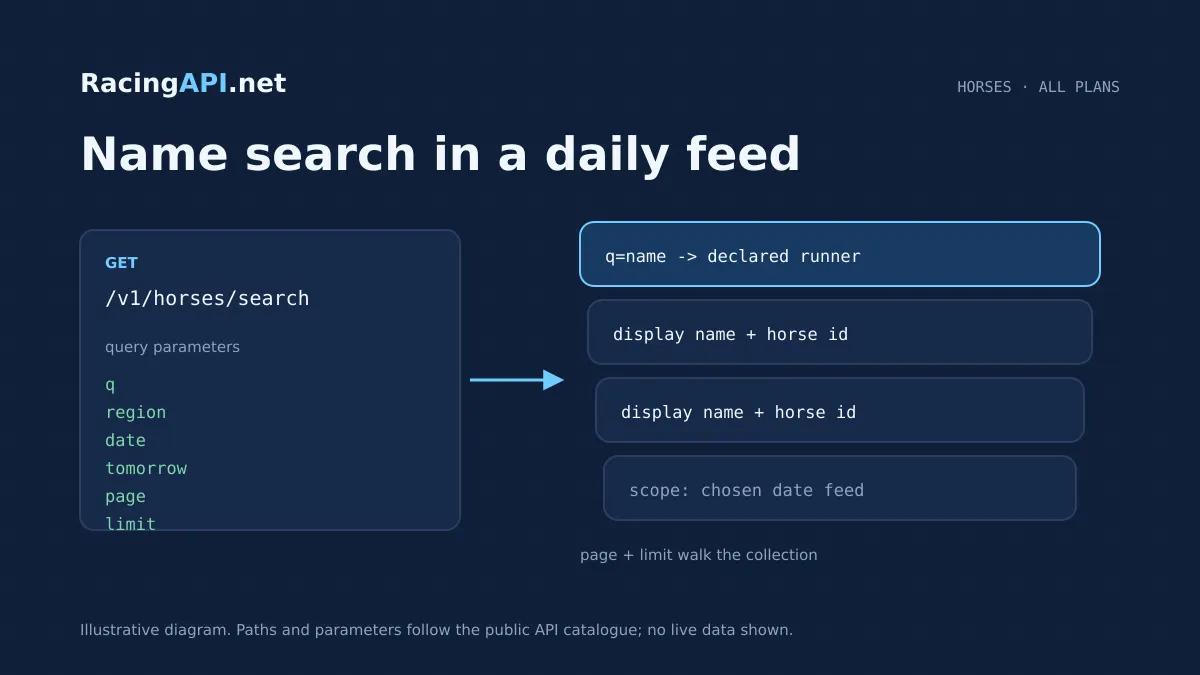
The Horse Search API gives you a practical way to look up declared runners by name inside the selected daily feed. It is designed for live product journeys rather than broad archival research: a user types part of a horse name, your app sends a case-insensitive query, and you receive matching declared runners from the chosen UK-and-Ireland feed. That makes it well suited to racecard search bars, runner pickers, and internal tools where users already know roughly what they want to find.
Because the endpoint works on declared runners in a specific feed context, it helps you build a precise search experience without pretending to be a universal horse database. You can show the horse name, link out to the correct horse profile or race context, and keep the search workflow aligned with the daily data your users actually need. The feed scope is explicit, the search is paginated, and the response is empty when nothing matches, so your interface can stay clean and predictable.
What this service gives you
- Fast name lookup for declared runners in a single, controlled feed.
- Clean pagination and empty-result behaviour for straightforward UI design.
- Clear feed-based scope that fits live race-day products and internal tools.
How the horse search endpoint fits into a live product flow
This endpoint is a GET request at /v1/horses/search, and the core input is the q parameter. The search is case-insensitive and matches a substring of the horse name, so buyers can support partial-name lookups without forcing exact spelling. In practice, this is ideal for a search box with server-side debounce, where you only query after a short pause and then replace the dropdown or results panel with the latest matches.
The response is built around declared runners in the selected daily feed, not every horse ever recorded. That matters when you are designing the interface: the user is searching within a current region and date context, so the result set should feel like a live operational tool, not a historical archive. If nothing matches, the API returns an empty list rather than a special placeholder result, which keeps your frontend logic straightforward.
- Use a short debounce interval in the UI to avoid unnecessary requests.
- Show results as selectable runners, not as a free-form name suggestion list.
- Keep the feed context visible when users search by date or tomorrow feed.
What the search covers, and what it does not
The scope is the combined UK and Ireland feed, accessed through region=uk. There is no separate Ireland region code for this endpoint, and other regional feeds are not part of customer access here. You can also choose a specific date with date=YYYY-MM-DD, or request the documented tomorrow feed with tomorrow=true, but those two controls cannot be used together. That makes the endpoint suitable for same-day planning, tomorrow previews, and date-specific runner discovery.
It is important to treat the returned horses as daily-feed context rather than a complete career-history dataset. A horse may appear because it is declared in the chosen feed, and that is the right behaviour for race-day products, not for exhaustive historical research. If your application needs profile pages or longer-running statistics, you would pair this search with the horse profile and form endpoints rather than stretching this one beyond its role.
- region=uk is the only accepted region value.
- date and tomorrow are mutually exclusive.
- Results are limited to the selected daily feed context.
Building a better search experience for bettors, traders, and staff
The most useful implementation is usually a typeahead or lookup panel. A user enters a few characters, the frontend waits briefly, then requests matches and displays them as clickable rows. Because the API searches by substring, you can support people who only remember part of a name, and you can keep the UI compact by showing only the fields you actually need to let them choose the right runner. Once selected, that horse ID can feed the next step in your app.
That next step might be a racecard link, a profile drawer, a saved watchlist, or a back-office check for declarations. The key design point is that IDs come from the feed, not from name matching in your own code. Display names can change in presentation or appear similar across runners, so your app should always store the returned identifiers and use them for downstream requests. That protects you from ambiguous names and keeps navigation consistent.
- Use the search result as a chooser, then persist the returned ID.
- Do not infer identity from the display name alone.
- Link the chosen horse into profile, form, racecard, or results views as needed.
Ready to call /v1/horses/search? All plans, one API key.
A straightforward integration workflow from query to selection
A sensible integration usually starts with an input field, a loading state, and a small result list. When the user types, your application calls /v1/horses/search with q plus the relevant feed controls. If you are building around today’s cards, you use the default daily feed context; if you are building a future-facing workflow, you can switch to tomorrow=true, provided you do not combine it with date. The search is paginated, so your interface can request the next page only when a user scrolls or explicitly asks for more.
For API consumers, the main implementation decision is how much of the result list to expose at once. A limit value lets you control page size, while page gives you one-based pagination. Beyond the last page, the data array is empty and meta.total still reflects the total before pagination, which is useful if your UI wants to show the number of matches while allowing the user to continue paging. This is especially helpful in admin tools and analyst dashboards where people expect a full list view.
- Send q as a URL-encoded query string value.
- Choose date or tomorrow depending on the feed context you need.
- Use page and limit to manage larger match lists cleanly.
How to read the search results correctly
The returned rows represent unique declared runners in the selected feed. That means each match is tied to a live daily context, not a synthetic catalogue entry. If the same horse is relevant in a different feed date, it should be requested in that context rather than assumed from the earlier response. Your application should therefore treat the endpoint as a live selector that helps users locate the right runner at the right time.
This also affects how you present related information. If you want to show a horse profile card, keep in mind that the search endpoint itself is not the profile endpoint; it is the way into the correct horse identity. From there, a dedicated profile call can provide richer detail, while form statistics can add daily-feed performance context. Keeping these products separate gives you a cleaner architecture and a more trustworthy user journey.
Practical uses for commercial horse racing products
A bookmaker-facing or analyst-facing product can use horse search to help users jump directly from a name fragment to the right runner. For example, a racecard page can offer a search field above a list of declared horses so that visitors can jump quickly to a runner’s row or profile. The same flow works in internal dashboards where traders, editors, or support staff need to locate a runner without scrolling through the whole card.
You can also use it to support saved lists, watchlists, or content management tools. If your users are editing preview content or cross-checking declarations, the endpoint gives them a controlled way to confirm which runner they mean before taking a further action. Because the endpoint is feed-scoped, it also helps prevent accidental lookups against irrelevant historical data when the task is clearly race-day oriented.
Commercial integration details that matter in production
Horse Search API is part of RacingAPI.net’s core REST feeds on all active plans, so you can build the search feature without moving to a separate product tier. Keys stay on the customer’s server, which suits backend lookup flows and server-side rendering. The endpoint is accessed using your normal account access on the site, and subscriptions, cards, and invoices remain managed there as well. For a buyer, that means a clean setup: sign in, confirm access, and start wiring the search into your own application.
The commercial model is simple enough for product planning. Developer includes 10,000 monthly requests at 2 requests per second, Professional includes 100,000 at 5 requests per second, and Enterprise includes unlimited monthly requests at 10 requests per second. Monthly quotas reset on the first UTC calendar day of each month. New eligible customers can take one seven-day trial after on-site checkout with a card, and the trial only begins after that checkout confirmation. Renewal is automatic unless cancelled.
Frequently asked questions
What does the Horse Search API actually search?
It searches declared horses by name within the selected daily feed. The match is case-insensitive and uses a substring search, so users can find a runner from part of the name rather than needing an exact full entry. It does not search a global horse universe or a complete historical database, so the result set should be treated as feed-specific and time-specific.
How should I use the returned results in my app?
Use them as a selectable list of runners, then store the returned horse ID for downstream calls. That is the safest way to avoid ambiguity when names are similar or when the same horse is relevant in a different feed context. The endpoint is best used as the first step in a flow that leads to a profile page, racecard view, or results lookup.
Can I search the UK and Ireland feed separately?
No. For this endpoint, the accepted region value is uk, and that combined feed includes UK and Irish meetings. There is no separate Ireland code here, and other regional feeds are not exposed through this service. If your product needs to distinguish between meeting locations, you should do that in your UI or downstream logic, not in the region parameter.
Can I use both date and tomorrow together?
No. They are mutually exclusive controls. Use date=YYYY-MM-DD when you want a specific feed day, or tomorrow=true when you want the documented tomorrow feed. The endpoint is designed this way so that your application chooses one feed context at a time, which keeps search behaviour predictable for users.
How does pagination behave?
The endpoint is paginated with one-based page numbers and a limit value that controls the number of items returned per request. If you request beyond the last page, the data list is empty, but meta.total still reflects the total before pagination. That makes it easy to build result counts, infinite scroll, or a next-page button without guessing how many matches exist.
Is this endpoint enough for full horse information?
No. It is a discovery endpoint, not a full profile service. It tells you which declared runners match the name fragment in the selected feed, but it does not replace profile, form, or race-specific endpoints. Most production products use it as the entry point, then move to a dedicated horse profile or form call once the user has selected the right runner.