Horse Racing Race Details API
Retrieve a single race record by ID and build focused race-detail pages without reloading the full racecard.
Endpoint
GET/v1/races/{id}
- Access
- All plans
- Coverage
- UK and Ireland
- Updated
- 1 Nov 2026
- Read
- 7 min
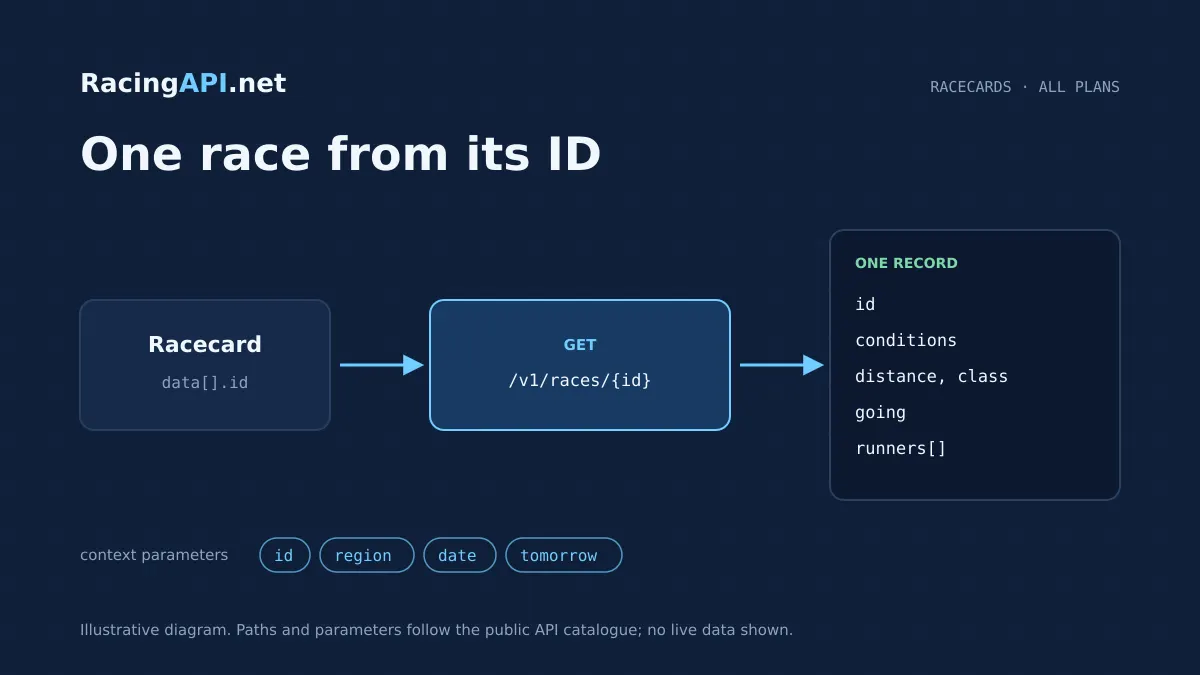
The Horse Racing Race Details API gives you one race record at a time, keyed by the race ID already returned in the racecards feed. It is designed for products that need a focused race view rather than a full meeting listing: a race preview page, a runner card drill-down, a live event panel, or a results-linked detail screen. Because the route works from an existing feed ID, your application can move cleanly from list to detail without relying on name matching or building its own race catalogue.
This endpoint belongs to RacingAPI.net and follows the same daily-feed logic as the rest of the racecard stack. You can request a race for a specific date or use the documented tomorrow feed, with region fixed to uk for the combined UK and Ireland coverage. That makes it suitable for same-day preview workflows, scheduled publishing, and race-centred interfaces where date context matters as much as the race itself. It is a lookup service, not a universal archive, so the right integration pattern is to keep the feed date with the ID and fetch the matching record when you need the details.
What this service gives you
- Render one race page from one known ID.
- Keep preview, odds and results tied to the same record.
- Avoid fragile name matching and duplicate racecard fetches.
Build from the race ID already in the feed
The contract is intentionally narrow: GET /v1/races/{id} returns one race and its runners. The id is opaque and comes from the corresponding field in the daily racecards feed, so your software should store it as a string and pass it through unchanged. That is the cleanest route-to-record mapping, and it avoids fragile matching on track names, time strings, or runner names. If the ID is missing or wrong, the lookup will not guess; missing races return 404.
For commercial use, this is a practical advantage. Your front end can render racecards as a list, then open a dedicated detail view only when the user taps a specific race. Your back end can also use the same pattern for cached previews or scheduled content jobs. Because each record is tied to the feed date, you retain the context that made the selection valid in the first place instead of treating race data as a timeless database entry.
- Use the racecard feed ID directly in the path.
- Keep IDs as strings in storage and API payloads.
- Treat 404 as a genuine missing record, not a renamed race.
Keep the date context with the lookup
The endpoint accepts either date=YYYY-MM-DD or tomorrow=true, but not both. That choice matters because the feed is daily and the contract does not promise a complete long-term archive. If you are building a race preview page, the date parameter lets you revisit the same meeting context later in the day or on a specified service date. If you are publishing ahead of time, tomorrow=true gives you the documented next-day feed without mixing it with a date filter.
This works well for content workflows where editors prepare race pages before the meeting begins. You can store the race ID alongside the service date in your own database, then re-fetch the exact record when the page is needed. That approach also helps when a customer bookmarks a race or when an internal tool needs to show the same meeting on the day it was listed. The point is consistency: the route serves a known race in a known daily context, not a synthetic lookup over all history.
- Choose one date mode per request: date or tomorrow.
- Do not assume archive completeness beyond the daily feed scope.
- Persist the feed date with the ID in your own application.
Display the race conditions that matter to buyers
A race-detail page built from this endpoint can show the core race conditions that users expect to see before reading the runners: distance, class and going. Those fields are the practical backbone of a preview screen, a betting comparison page, or a race information module embedded in a broader sports product. They help a customer understand the shape of the race before they drill into entries, declarations, or linked odds.
The feed also supports a stronger user journey because the detail screen is not just a static summary. You can keep the race conditions visible while the user scrolls runners, compare one race with another at the same meeting, or hand the record off to a results screen later in the day. That is especially useful where a single meeting page needs to connect preview, race status and post-race reporting without multiple unrelated lookups.
- Show distance, class and going together on one page.
- Use the record as the source for race-focused UI labels.
- Keep the same race ID in preview and follow-up views.
Ready to call /v1/races/{id}? All plans, one API key.
Turn the response into a runner-by-runner detail view
The endpoint returns the race and its runners, so it is suitable for building a declared-runners panel without first calling a separate racecard list page. That means you can present the field in one API call when the user is already on the race detail page. A commercial application can use this to power draw-based filtering, runner sorting, form-linked navigation or a compact mobile layout where screen space is limited.
Because this is a single-record lookup, the useful pattern is to fetch the race once and then render the runners from that response. If your product also shows horse, jockey or trainer detail, those are separate services and should be linked by their own IDs where available. This endpoint is about the race context itself: the declared runners, the conditions under which they line up, and the identity of the race in the daily feed.
- Use one request to render the race and its runners.
- Link out to horse, jockey or trainer services when needed.
- Keep the race page focused on declared participants, not whole-meeting browsing.
Connect the race page to odds and results without duplicating work
A useful race detail page often needs two follow-on states: one for prices and one for the result. This endpoint gives you the base race record, which you can then join to the Horse Racing Bookmaker Odds API or the results endpoints using the same race identity. That lets you keep the race page coherent across the day: preview in the morning, prices when available, and result context after the race has been run.
The important point is that you do not need to refetch every racecard to maintain that page. You can store the race ID in your application state, use it for the detail request, and then link the same record to the odds feed or the result record when those are required. For operators, that means fewer moving parts in the user journey. For editors, it means one canonical race page rather than multiple disconnected data fragments.
- Pair the race detail with separate odds and results endpoints.
- Reuse the same race ID across preview and post-race states.
- Avoid rebuilding the entire meeting just to update one race page.
A simple workflow for product teams and developers
A typical integration starts with the racecards list, where you collect the race ID from the chosen daily feed. Your application then calls GET /v1/races/{id} with region=uk and either date or tomorrow, depending on which meeting day you want to resolve. The response can be cached in your own stack according to your product’s policy, but the key design choice is to keep the ID and the feed date together so the detail call always lines up with the right meeting.
From there, your UI can branch in a few clear ways. A web app might open a modal with the full race conditions and runners. A publisher might generate a dedicated race page for SEO and internal navigation. A trading or operations tool might pair the response with odds and then refresh later to show results. Because the endpoint is read-only and narrowly scoped, it fits naturally into systems that already separate lists, details and post-race records.
- Start with a racecards ID, then fetch the detail record.
- Choose date or tomorrow depending on the meeting you want.
- Use the same record in web pages, internal tools or content pipelines.
What this service does — and what it does not
The data scope is UK and Ireland only through the combined region=uk feed. Ireland is not a separate customer-facing region code here, and no other regional feeds are included. Horse, jockey and trainer data in this environment are daily-feed context rather than a universal career-history database, so the race page should be presented as a current feed record rather than a complete historical archive. That distinction keeps your product accurate and avoids over-promising what the service is meant to supply.
The same discipline applies to related race information. Racecourse weather is separate from official going, silks are PNG owner colours rather than portraits, and bookmaker odds are supplied prices rather than a guarantee of universal market availability. If you are wiring the race page into a commercial app, those related services can be layered in where required. The race detail endpoint remains the core record for one race, one ID and one daily context.
- Use region=uk for the combined UK and Ireland feed.
- Treat horse, jockey and trainer data as daily-feed context.
- Keep weather, silks and odds as separate linked services.
Frequently asked questions
How do I get the race ID for this endpoint?
You take it from the corresponding field in the racecards feed for the same region and day. The ID is opaque, so you should store it exactly as returned and pass it into /v1/races/{id} without trying to rebuild it from the race name or time. That keeps the lookup aligned with the daily feed record.
Can I use region values other than uk?
No. The contract only accepts region=uk for this endpoint, and that combined feed covers UK and Ireland meetings together. Other regional feeds are excluded from customer access for this service, so your integration should hard-code uk wherever the region parameter is used.
Should I use date or tomorrow?
Use date=YYYY-MM-DD when you want a specific service day, or tomorrow=true when you want the documented tomorrow feed. You cannot combine the two in the same request. If you are building scheduled content, keep the chosen date alongside the race ID so the detail lookup stays consistent.
Does this endpoint give me historical race coverage?
It is a daily-feed lookup, not a global archive. The contract notes that continuous archive completeness is not guaranteed, so you should not treat it as a full historical database. It is best used for current and feed-specific race detail pages, with the ID coming from the relevant daily racecards feed.
Can I use this race detail record to show odds and results?
Yes, but as linked services rather than as a replacement for them. The race detail endpoint gives you the base race and its runners, which you can then combine with the odds feed or the results endpoints using the same race identity. That way your page stays coherent across preview, pricing and post-race states.
Is this the right endpoint for a single race page in my app?
Yes. This is the best fit when you already know the race ID and want one focused record with the race conditions and runners. It is not meant for searching by name or browsing a whole meeting from scratch; it is a direct detail lookup for a known race in the daily feed.