Horse Racing Widgets for WordPress
Complete, styled UK and Irish racecards, results and tips on your WordPress website. Design free; included with Professional and Enterprise for one website.
Server-rendered HTML
HTML/widget-content/{widgetId}
- Access
- Included with Professional
- Licence
- One HTTPS website
- Includes
- Cards, results, tips
- Coverage
- UK and Ireland
- Updated
- 7 Nov 2026
- Read
- 8 min
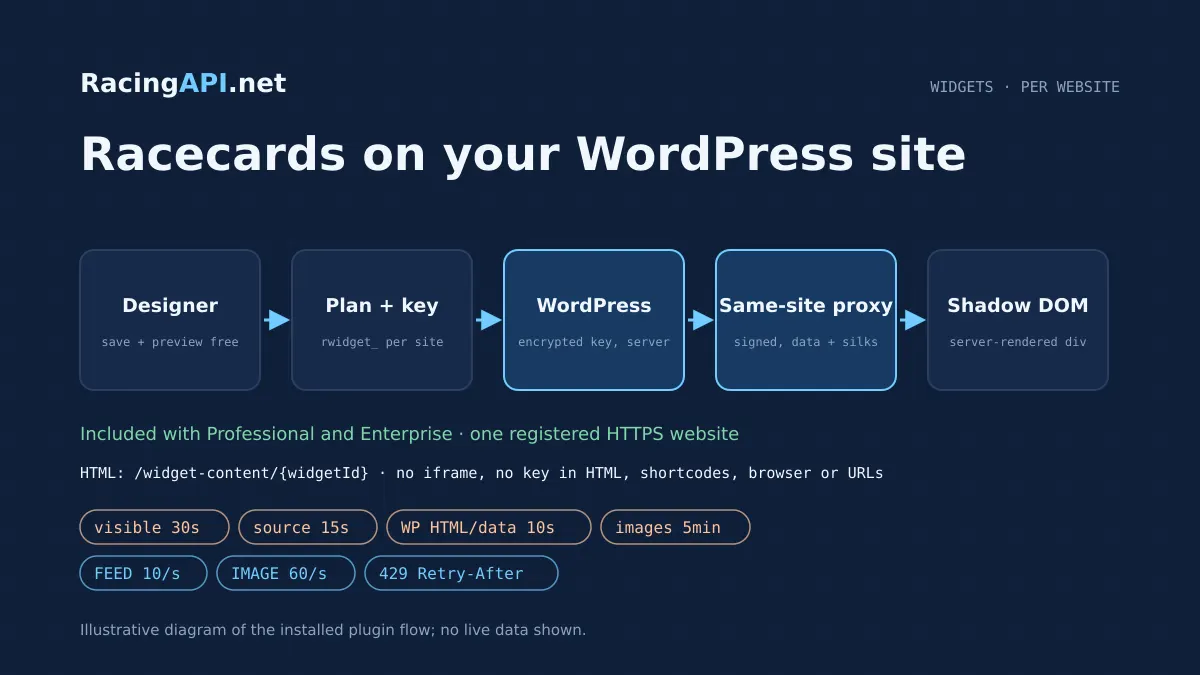
Horse Racing Widgets put professional UK and Irish racecards, results and tips on a publisher's own WordPress website without writing an integration. You design the look in the RacingAPI.net widget designer, register the website you want to publish on, and install a small plugin that renders the racing content on your server. Visitors see complete racecards in your colours and fonts, served from your own domain, while the website-bound key that unlocks the data never leaves your WordPress installation.
Widgets are included in the Professional plan at GBP 79 a month and in Enterprise, with no separate widget subscription or additional widget charge. Each account can register one HTTPS website for publishing and generate one active website-bound widget key. Designing, saving and previewing remain free for every account. Plugin downloads, key creation and live embedding require active Professional or Enterprise access, including a confirmed eligible main-plan trial. Signing up alone does not activate a trial or installation rights.
What this service gives you
- Complete UK and Irish racecards, results and tips on your own WordPress website.
- Design and preview free; widgets for one registered website are included with Professional and Enterprise.
- Server-rendered HTML with keys kept on your server, never in the browser.
What your included widgets offer
Every eligible registered website receives the full widget content set rather than a tiered selection. That means daily racecards with runners, connections, silks and bookmaker odds boxes; a results view covering the previous five days; tomorrow's cards once they are declared; and the saved tips section. Tips presentation is included with both Professional and Enterprise widgets, while direct REST access to tips remains Enterprise-only. Your widget key authorises rendering and never acts as a public REST key.
The shared racecards widget brings these areas together under one installed component, with date navigation, results, tips, favourites and statistics available to readers. For publishers who prefer separate placements, independent shortcodes render racecards, results or tips on their own, so a news article can carry a results block while the racing hub carries the full card. Nothing in the widget is invented: when data has not been supplied, the widget says so instead of filling the gap with sample runners, fabricated prices or placeholder form.
- Racecards, results and tips included on every paid website
- Results from the previous five days through to tomorrow's cards
- Tips limited to selections prepared today with positive estimated value
- No fabricated racing data, sample runners or synthetic fallback picks
Designing a widget that matches your site
The designer at /dashboard/widgets is where every widget begins. You choose fonts, text and accent colours, header treatment, background, corner radius and borders, then style the odds boxes and decide how bookmaker links appear. A live preview shows the result against representative layout, and the design can be saved and revisited as often as you like before paying. Editors can therefore agree the look with a sales team or a client without committing to a subscription.
Beyond the overall widget, the shortcode generator can build placements for a specific racecourse and day, which suits a festival preview page or a course-sponsored feature. Each shortcode references a saved design by identifier only. Those identifiers describe what to render; they are not credentials, and possessing one never grants access to content. Authorisation always comes from the encrypted key held by the registered WordPress installation.
Widget styles are encapsulated so that ordinary theme rules do not unexpectedly restyle the racecard. A theme's global button colour or table border will not leak into the odds grid. This is protection against accidental overrides, not a lock: the site owner, a page builder or custom host JavaScript can still modify, hide or remove the widget, and RacingAPI.net does not attempt to prevent a site owner controlling their own pages.
- Fonts, colours, headers, background, radius and borders
- Odds box styling and bookmaker link presentation
- Course-and-day shortcode generator plus independent racecards, results and tips shortcodes
- Free design, save and preview before any payment
How the installed plugin renders racing content
The installed plugin does not use an iframe. WordPress outputs a server-rendered div containing declarative Shadow DOM, so the racecard markup is present in the page HTML your visitors and their browsers receive. The upstream content route, /widget-content/{widgetId}, returns server-rendered HTML to your WordPress server rather than a JSON REST response for you to template, which is why the product is described as HTML rendering rather than an endpoint you call from your own code.
Interactive requests after the first render, such as opening race details, changing date or loading silks, travel through a same-site signed proxy inside WordPress. The browser talks only to your own domain; the plugin signs the request and fetches from RacingAPI.net server-to-server. The encrypted website key stays on the WordPress server and never appears in HTML, shortcodes, browser storage, JavaScript or URLs.
Because rendering is HTML-first, readers see a meaningful racecard even before scripts finish loading. Search engines can also see that markup, although indexing of widget content is never guaranteed and depends on your own pages, theme and search engine behaviour. Treat the widget as a reader feature first and an SEO opportunity second.
- Server-rendered div with declarative Shadow DOM, no iframe in the installed plugin
- Same-site signed WordPress proxy for data, race details and silks
- No keys in HTML, shortcodes, the browser or URLs
From design to live racecards, step by step
The setup order keeps plan access, key issue and installation aligned with one real website. First design and save the widget for free. Activate Professional or Enterprise through the normal on-site subscription checkout, or use your existing eligible plan; there is no second widget checkout. Register the HTTPS address where you will publish, generate one rwidget_ key bound to that website, and download the plugin ZIP. An active eligible main-plan trial also permits installation. Developer accounts can preview designs but must upgrade before publishing them.
Upload and activate the plugin in WordPress, then enter the key in its settings screen, where it is stored encrypted. The plugin verifies the site through a public HTTPS callback that proves the installation answers on the registered address. When verification completes, copy the shortcode from the designer or generator and paste it into any post, page or block area. The racecards appear immediately in your saved styling.
- Design and save the widget in the dashboard
- Activate Professional or Enterprise and register one HTTPS website
- Generate the website-bound rwidget_ key and download the ZIP
- Install the plugin, enter the key, complete HTTPS callback verification
- Copy the shortcode into your posts and pages
Design it before you pay. Included with Professional and Enterprise for one website, one website-bound key.
One website, one active key
Professional and Enterprise include exactly one registered canonical widget website per account, and that website has one active key at a time. Addresses are normalised before comparison, so www and non-www forms, trailing slashes and paths on the same host count as the same website. Subdomains are separate websites and cannot share its installation rights. Registering multiple websites is blocked on the server. Contact support if you need to change the registered website or discuss additional websites; there is no separate self-service widget subscription.
Rotating a key revokes the previous key immediately. The plugin stops rendering until the new key is entered and the site reconnects, so plan rotation for a quiet moment rather than the middle of a big race afternoon. Uninstalling the plugin does not cancel billing; cancellation is done from the dashboard and takes effect at the end of the current paid period, with the widget continuing to work until then.
- www, trailing slash and path variants normalise to one website
- One website included with Professional or Enterprise; subdomains cannot share its key
- Rotation revokes the old key immediately and needs a reconnect
- Cancellation applies at period end; uninstalling does not cancel billing
Refresh timing, caching and request limits
Visible widget content refreshes every 30 seconds in the reader's page. Behind that, source data is refreshed every 15 seconds, the WordPress plugin caches HTML and data for 10 seconds, and silk images are cached for five minutes. Live odds are never held in a 24-hour cache, so prices shown beside runners follow the supplied feed rather than going stale for a day.
Monthly requests are unlimited. Short-term protection applies per account: a FEED limit of 10 requests per second and a separate IMAGE limit of 60 requests per second. When either is exceeded the service answers 429 with a Retry-After header, which the plugin respects. Every authenticated widget request, including requests answered from the service cache, is recorded against the owning customer and website, giving you clear usage history. Widget usage and REST quotas are counted separately, so a busy racing hub does not consume an API plan's allowance.
- Visible refresh 30s, source 15s, WordPress HTML and data 10s, images 5 minutes
- No 24-hour cache on live odds
- Unlimited monthly requests; FEED 10/s and IMAGE 60/s per account, 429 with Retry-After
- Usage recorded per customer and website, separate from REST quotas
Security model and custom integrations
Widget identifiers alone never authorise content, and an anonymous generic div with a public JavaScript snippet is not a supported way to embed the product. Allowing that would let anyone copy markup from a paid site and render the same cards on an unpaid one. Every render is authenticated by the registered site's key through its own server.
Publishers running a custom CMS rather than WordPress can integrate, but must provide the equivalent: authenticated server-side rendering, keys held only on the server, and a same-site signed proxy for data, details and silks. An insecure public snippet is not an acceptable substitute. The documentation at /docs/widgets sets out the expected behaviour for custom server integrations.
Who should choose widgets over the REST API
Widgets suit racing news sites, tipster blogs, affiliate publishers and racecourse partners who want complete professional racecards quickly and would rather spend time on editorial than on rendering code. The REST API suits teams building their own interfaces, apps or data products. Professional combines both approaches: your plan includes REST access and widgets for one website. Widget traffic has its own rate limits and usage counters, so it does not consume your REST monthly allowance. Enterprise also includes widgets, while Developer users can design and preview before upgrading.
Whichever you choose, the content is for display on your own registered website. Reselling, redistributing or exposing the underlying racing data or API access to third parties is not permitted, and widget content should not be scraped into a separate data feed.
Frequently asked questions
How much do horse racing widgets cost?
Widgets for one registered HTTPS website are included with Professional at GBP 79/month and Enterprise at no additional charge. There is no separate widget subscription. Designing, saving and previewing are free, and no VAT is added.
Is there a free trial of the widgets?
Widgets follow your main plan access, including an eligible confirmed Professional or Enterprise trial. Signing up alone does not start a trial. Design and preview are free on all accounts; Developer does not include publishing.
Do I need a REST API plan to use the widgets?
Yes. Active Professional or Enterprise access includes widgets for one website. There is no separate widget checkout. Widget keys are distinct from REST keys, and widget usage is recorded separately from REST quotas. REST tips and MCP remain Enterprise-only.
Are tips included, or do I need Enterprise?
Tips are included on every paid widget website, alongside racecards and results. Enterprise is only relevant to REST and MCP access. The tips view shows selections prepared today with positive estimated value; it never invents a pick when none qualifies.
Does the widget use an iframe or expose my key?
No iframe is used by the installed plugin. WordPress outputs a server-rendered div with declarative Shadow DOM, and follow-up requests go through a same-site signed proxy. The encrypted key stays on your WordPress server and never appears in HTML, shortcodes, the browser or URLs.
Can I paste a generic div and script on any site?
No. Widget IDs alone are not authorisation, and anonymous generic div JavaScript embedding is not supported. Non-WordPress sites must implement equivalent authenticated server rendering and a same-site proxy, as described in the widget documentation.
What happens if I rotate the key, uninstall or cancel?
Rotating a key revokes the old one immediately, so the plugin needs the new key and a reconnect. Uninstalling the plugin does not stop billing. Cancelling in the dashboard ends the subscription at the close of the current paid period.
Can my theme restyle or hide the widget?
Encapsulated styles stop ordinary theme CSS from accidentally restyling the racecards. As the site owner you, your page builder or host JavaScript can still modify, hide or remove the widget. Search indexing of widget content is not guaranteed.