AI Horse Racing Tips API
A read-only Enterprise feed for publisher-ready horse racing tips, filtered and paginated for live displays or analysis history.
Endpoint
GET/v1/tips
- Access
- Enterprise plan
- Coverage
- UK and Ireland
- Updated
- 1 Nov 2026
- Read
- 7 min
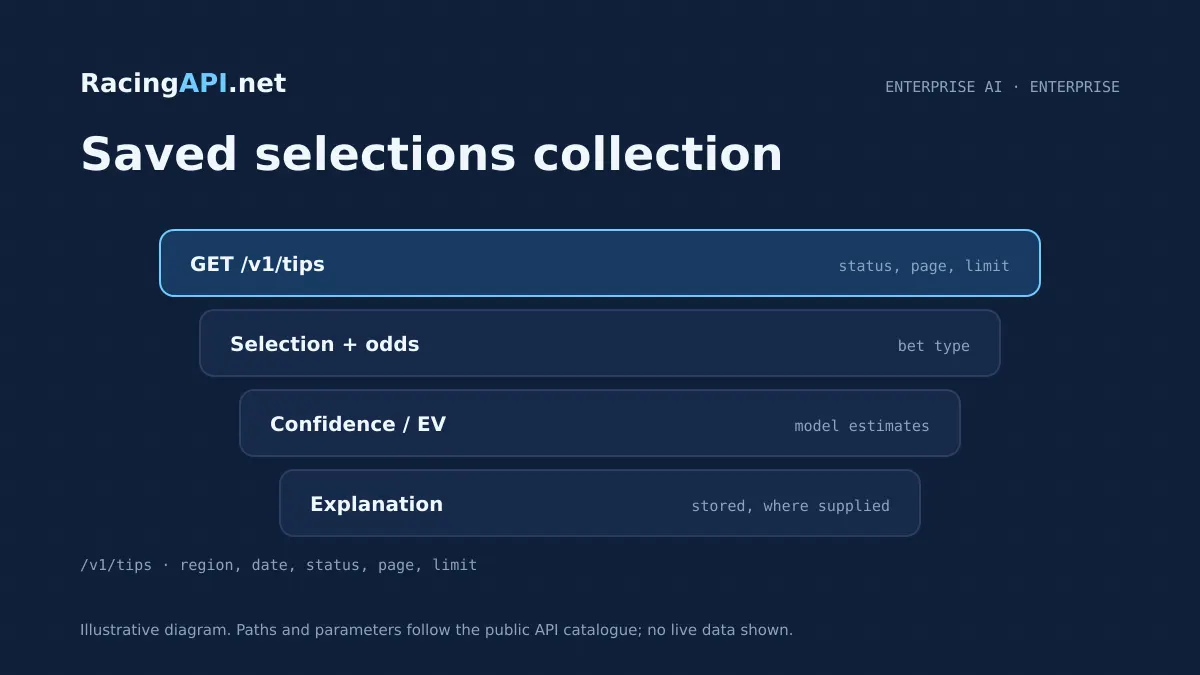
The AI Horse Racing Tips API on RacingAPI.net gives you a read-only way to retrieve saved UK and Irish selections for a tips page, odds table or internal editorial workflow. It is not a live prediction engine and it does not generate new analysis when you call it. Instead, it returns pre-generated records from the feed, with optional date retrieval, status filtering and pagination so you can show the right set of tips in the right place.
This endpoint is built for teams that need a clean, controlled publishing feed rather than a generic model output. A customer-facing tips panel can request only active records, while an archive or analyst view can browse settled, withdrawn, pending or no-selection items for a given saved date. The records are combined-region only, using region=uk, and the feed uses the IDs it contains rather than trying to match on horse names. If a record is pending, it has no selection; if it is stale or withdrawn, it should not be treated as an active tip.
What this service gives you
- Ready-made tips data for live pages, archives and internal workflows.
- Clear status filtering so you only publish the records you intend to show.
- Saved explanations and model estimates arrive with the stored selection context.
What this endpoint is designed to do
This service exists to supply saved tips for publication, not to act as a freeform betting adviser. Because the response is stored retrieval only, it fits neatly into websites, apps and dashboards that need a stable tips section with consistent editorial rules. You can surface the latest active selections on a homepage module, power a premium tipster area, or feed an internal review screen that compares active and settled records by date.
The data scope is deliberately narrow and practical. You are getting selections for the combined UK and Ireland racing region, with the option to ask for a specific saved analysis date. That makes it useful for day-by-day publishing and back-office checking without implying universal coverage beyond the daily-feed context. It also avoids confusion between active selections, pending records and entries that should be treated as withdrawn, stale or otherwise not displayable.
- Use case: tips pages, premium dashboards, editorial archives, internal QA.
- Scope: combined UK and Ireland racing only, via region=uk.
- Behaviour: retrieves stored records; does not trigger new AI generation.
How to query the feed and control the result set
The core call is a GET request to /v1/tips. You can leave the date out to retrieve the default saved set for today, or provide a date in YYYY-MM-DD format to pull the stored records for that analysis day. That distinction matters: the endpoint reads what already exists, so it is safe to use in production publishing flows without worrying about it quietly creating a new tip on demand.
Filtering happens before pagination, which is important for display logic. If you want a customer-facing page, request status=active so you only show tips intended for publication. If you are building an archive, report view or editorial queue, you can use the other statuses to inspect pending, no_selection, withdrawn, stale or settled records. Then apply page and limit so your interface can render manageable batches, with page counted from one and limit accepted from 1 to 100.
- GET /v1/tips
- Optional query: region=uk, date=YYYY-MM-DD, status, page, limit
- Status filter is applied before page slicing.
What you can expect to display from the tip records
The saved tips are meant to support a publisher-style presentation, so the records can be used to show the basics punters look for first: the selection itself, the bet type, the odds used in the saved analysis and the relevant jockey and trainer context where supplied. The model estimates included with the record are best treated as model output, not calibrated guarantees. That gives you enough structure for a clear card or table without implying certainty or profit.
Where the feed includes saved explanations, those are fixed two-sentence notes prepared in advance and paired with the selection version they belong to. That pairing matters if you are caching or rendering historical pages, because the explanation should stay attached to the exact saved tip record rather than being re-generated later. If a record has no supported selection, do not invent a fallback tip or substitute a guess from another day.
- Publisher-friendly display: selection, odds, bet type, jockey/trainer context.
- Saved explanations are fixed and two sentences long where supplied.
- No supported selection means no fabricated fallback tip.
Ready to call /v1/tips? Enterprise plan, one API key.
How to handle statuses in a live product
Status handling is one of the main reasons this endpoint is useful in production. Active records are the natural fit for a live tips page. Pending records should be treated as not yet having a selection, so they are better suited to editorial workflows than public display. Withdrawn and stale records should not be shown as current tips, even if they remain useful for audit trails or internal history views.
Settled records are valuable when you want the same endpoint to support both a current view and a historical view. For example, your UI can default to active for public visitors and provide a separate archive tab for analysts or logged-in subscribers. Because the filter is applied before pagination, each view stays logically consistent: you are paging through one status group rather than mixing active and non-active records on the same screen.
- Public tips pages: use status=active.
- Archive/review views: use pending, withdrawn, stale or settled as needed.
- Pending means no selection; stale/withdrawn should not be presented as active.
Practical ways to build the front end around it
A simple card layout works well if you want the tips feed to feel editorial. Each card can show the selection name, the odds from the saved record, the bet type, and a short explanation if one is present. A table is better if you want to compare multiple selections across a date, especially when you are showing active picks alongside settled or withdrawn items in a back-office interface. Either way, the key is to keep the display tied to the feed IDs rather than matching records by name.
If you are building a subscriber product, you can also use the endpoint as a source for sections such as "today's tips", "latest active selections" or "historical tips by date". Since the feed is read-only and stored, it suits cacheable pages and scheduled refreshes without the complexity of a generation workflow. Just remember that date-based retrieval returns saved records for that analysis day; it is not a live model request for new commentary.
- Card view for public tips pages.
- Table view for archive, admin or analyst screens.
- Use feed IDs, not name matching, when joining records in your app.
A sensible integration workflow for developers
Most teams will start by wiring the endpoint into a scheduled server-side fetch, then storing the response for rendering and review. A common flow is: request active tips for today, map the records onto your own presentation layer, and refresh on a schedule that suits your publication cycle. If you need an archive, add a date selector and pass the chosen saved analysis date back to the API so your UI stays in step with the feed.
From an access perspective, the endpoint sits within the Enterprise allowance and shares that 10 requests per second limit. Keys stay on your server, so the safest pattern is to keep the call server-side and expose only the formatted output to browsers or apps. That makes it easier to protect your credentials, enforce your own caching, and keep the account subscription, card and invoice administration on the site rather than inside your product.
- Recommended flow: fetch server-side, store or cache, render to your own UI.
- Use date selectors for archives and status=active for public output.
- Keep API keys on your server and never expose them in the browser.
Access, plan limits and what this feed is not
The AI Horse Racing Tips API is part of the Enterprise plan at RacingAPI.net, which includes unlimited monthly requests and a 10 requests-per-second allowance for active plans at that tier. Access is automatic after confirmation, and eligible new customers can receive one seven-day trial after on-site checkout with a card. Sign-up alone does not start a trial, renewal is automatic unless cancelled, and monthly quotas reset on the first UTC calendar day of each month.
This endpoint is not a promise of profit, a universal racing history database or a live recalculation service. It returns stored positive-EV selections, with saved prices and model estimates, not calibrated guarantees. It also does not replace your own publishing judgement: if a record is stale, withdrawn or pending, you should follow the status rather than forcing it into a live tips section. That keeps the product accurate and the user experience clean.
- Enterprise-only feed within RacingAPI.net.
- Unlimited monthly requests on Enterprise; 10 requests/second allowance.
- Do not treat saved EV estimates as guarantees or profit promises.
Frequently asked questions
Is this endpoint generating tips when I call it?
No. /v1/tips is a stored retrieval feed. It returns pre-generated selections that already exist in the system, with optional filters for date, status, page and limit. That makes it suitable for publishing and archive workflows because your call reads records rather than triggering a new AI run.
Which status should I use for a public tips page?
Use status=active for a customer-facing page. Pending records have no selection yet, so they are better kept out of the public tips view. Withdrawn and stale records should also stay out of the active section, even though they can still be useful in internal review or historical pages.
Can I retrieve tips for a past analysis date?
Yes. You can pass a saved date in YYYY-MM-DD format to retrieve the stored records for that day. This is retrieval only, so it does not create new content or recalculate the selection. It is useful for archives, editorial checks and subscriber pages that let users browse by day.
How should I handle the explanations that come with some tips?
Treat them as fixed, paired content. The saved explanations are exactly two sentences and belong with the selection version they were prepared for. If you cache or archive the response, keep the explanation attached to that same record so you do not mix it with another day’s tip or a different selection version.
Does the endpoint cover all racing markets and all historical data?
No. The feed is limited to combined UK and Ireland racing, using region=uk. It is daily-feed context rather than a universal career-history database, so horse, jockey and trainer information should be used within that context. If you need broader race data, use the other RacingAPI.net feeds built for racecards, results, profiles or form.
Can I use the feed content in my own product?
Yes, if you are displaying your own product output and not reselling or sharing the API itself. Keys must stay on your server, and account sharing or onward API access is not allowed. The feed is designed for integration into your own site or app, where you control the presentation and keep the access rules intact.