Horse Racing MCP Server for AI Assistants
A read-only Enterprise MCP connection for compatible AI assistants and developer agents using RacingAPI.net data.
Endpoint
MCP/api/mcp
- Access
- Enterprise plan
- Coverage
- UK and Ireland
- Updated
- 1 Nov 2026
- Read
- 7 min
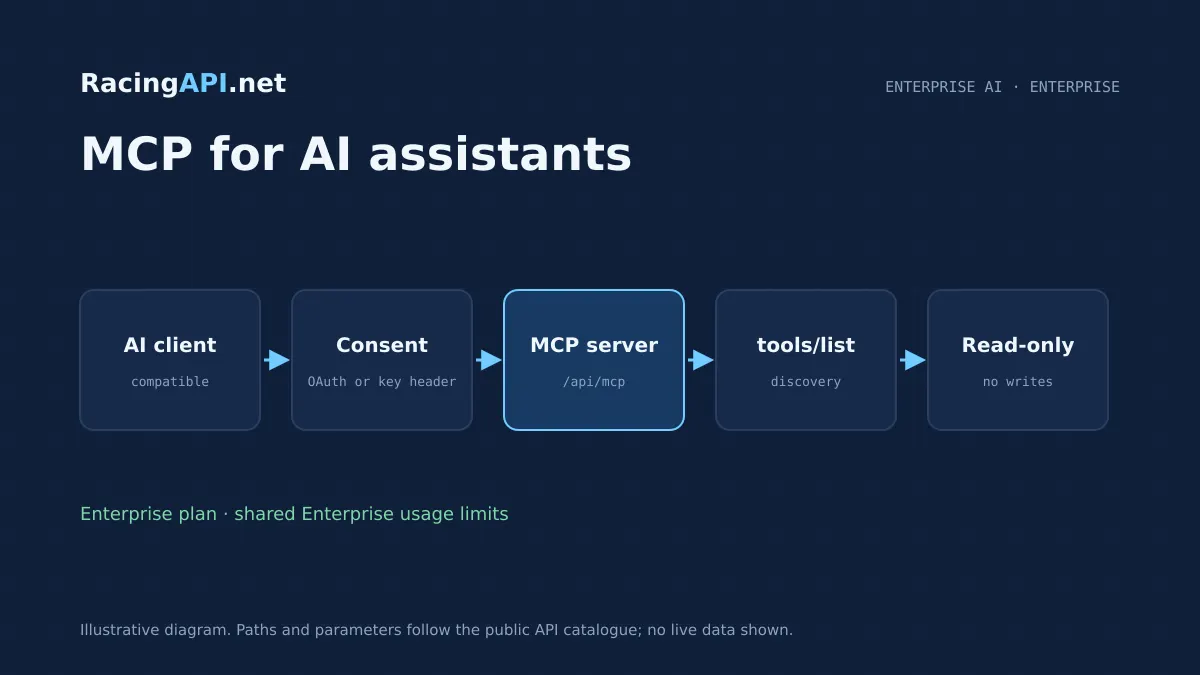
The Horse Racing MCP Server for AI Assistants gives Enterprise customers a clean, read-only way to connect compatible AI clients and developer agents to RacingAPI.net. It is designed for situations where you want an AI tool to look up racing data, inspect available actions and work with live feed context without turning your integration into a custom application layer. Because it is part of our Enterprise plan, it shares the same account and request usage framework as your other Enterprise access, rather than acting as a separate product.
This service is distinct from the REST feeds on the platform and distinct again from any support chat experience on a website. It is a structured machine-to-machine interface for compatible clients that can speak MCP, either through explicit OAuth consent or supported API-key headers. You can use it to let an assistant discover tools, read data and help your internal team ask better questions of the racing feed, while keeping all account control on-site and keys on your server.
What this service gives you
- Read-only AI access to RacingAPI.net data through a structured protocol
- Enterprise customers can connect compatible clients with explicit consent or supported headers
- tools/list discovery helps agents use the right tool without guessing
- Keeps keys and account control on your side
What the MCP server does in practice
The MCP server exposes a read-only connection for AI assistants and developer agents that already support the Model Context Protocol. Rather than replacing the REST API, it sits alongside it as a different integration choice. That matters when your workflow is conversational or agent-driven: the client can ask what tools are available, then use those tools to inspect racing data in a controlled way. It is not a writing endpoint, and it does not create, modify or submit racing records.
Because it is read-only, the service suits assistant-led lookup, internal research workflows and developer prototypes that need structured access to RacingAPI.net data without building a full custom UI first. You still decide how the client is authenticated and where the keys live. The server is part of the Enterprise plan, so the available usage and access model is aligned with your Enterprise subscription rather than a separate sandbox service.
- Read-only access for compatible MCP clients
- Enterprise plan feature with shared usage context
- Designed for assistant-led lookup, not data changes
How compatible clients connect
Connection depends on the client, because MCP support is client-side as much as server-side. We support explicit OAuth consent where the client can complete an authorised flow, and we also support API-key header clients where the software can send the right header format. That gives you two practical paths: one for assistants built around a consented account connection, and one for agent tools that are already set up to pass headers securely from your own environment.
The important operational point is that your keys stay on your server or in your controlled integration stack. You should not treat this as a shared public chatbot login or as a free-form support channel. Instead, think of it as a read-only machine interface for software you control, or software you have deliberately authorised. Access is automatic after confirmation, and account subscriptions, cards and invoices remain managed on-site.
- Explicit OAuth consent for compatible clients
- API-key header support for approved client implementations
- Keys remain under customer control, not in a shared consumer chat login
Tool discovery with tools/list
MCP clients do not need to guess what is available. The discovery flow starts with tools/list, which lets the client inspect the actual tool schemas before attempting a call. That is useful when you are wiring an assistant into a larger product, because the model or agent can see what each tool expects, rather than assuming a REST-style path or inventing parameters. In practice, this reduces integration friction and makes the connection easier to test in a controlled environment.
Discovery is especially helpful if you are building an internal assistant for racing research, content operations or analyst support. The client can first list what exists, then choose the relevant tool based on the task and the permissions you have authorised. This is not a universal support bot that improvises answers from generic knowledge; it is a protocol-based bridge to the RacingAPI.net service surfaces you already subscribe to.
- tools/list exposes real tool schemas
- Helps clients choose valid calls before execution
- Built for structured AI workflows, not ad hoc chat answers
What data the server can surface
The MCP server works with the same RacingAPI.net data scope that underpins our Enterprise feed access, but it should be understood as feed context rather than a universal racing archive. Horse, jockey and trainer profiles are daily-feed context, so they reflect the feed data available for the day rather than claiming complete lifetime records. That distinction matters if you are building an assistant that summarises form or connections and needs to stay grounded in current feed content.
Where the wider platform includes related assets such as racecards, race details, results, horse searches, profiles, connections and weather, the MCP layer is for read-only consumption of the data you are authorised to access through the protocol. Silks are PNG owner colours, not portraits. MET Norway weather forecasts are separate from official going, and the forecast content carries attribution and expiry rather than being presented as a substitute for going reports.
- Daily-feed context, not a universal career-history database
- Silks are PNG owner colours
- Weather forecasts are separate from official going and carry expiry/attribution
Ready to call /api/mcp? Enterprise plan, one API key.
What buyers can build with an Enterprise MCP connection
Teams usually choose this service when they want a racing assistant to help staff move faster without manually copying data between systems. A common use is an internal analyst assistant that can inspect racecards, pull race details, review results and present the relevant context in natural language. Another use is a developer agent that helps prototype a racing product by checking what tools exist and how to call them before the team writes a bespoke frontend.
You can also use the server to support editorial or operational workflows where staff want a guided, read-only interface to racing data. Because the connection is protocol-based, it suits product teams that already use MCP-aware software and want their assistant to work against live RacingAPI.net data under the same Enterprise usage rules. It is useful when you want structure, not a support chatbot that tries to solve every query on its own.
- Internal race research assistants
- Developer agents for prototyping and integration planning
- Editorial or operations tools with read-only live data access
Typical integration workflow
The practical workflow starts in your RacingAPI.net account. You confirm Enterprise access, choose the connection method that your client supports, and then connect the client using either explicit OAuth consent or the supported API-key header approach. Once the client can talk to the server, you use tools/list to see what the assistant can actually call. From there, your agent can query the available racing data in a controlled way and present the results inside your own product or internal workflow.
Because this is a service endpoint, not an app store plugin, you should test it in the same way you would test any production integration. Check that the client understands the returned schemas, that your team is comfortable with the assistant’s read-only scope, and that your implementation keeps account controls on-site. If you are already using REST feeds elsewhere, the MCP server can sit alongside them as the AI-facing layer rather than replacing your direct API work.
- Confirm Enterprise access in your account
- Connect via OAuth consent or supported key headers
- Use tools/list before making operational assistant calls
Enterprise usage, limits and commercial boundaries
This MCP server shares the Enterprise plan’s usage context rather than creating a separate quota system. Enterprise includes unlimited monthly requests with a 10 requests per second rate limit, and the monthly quota resets on the first UTC calendar day of each month. That makes it suitable for teams that want predictable access within the plan structure, while still using the same account-level controls and billing management that apply to your other subscription activity on-site.
Commercially, the service is meant for your own product or internal operations. Own-product display is allowed, but resale, onward API access and account sharing are not. That means you can build a customer-facing experience that uses your authorised Enterprise access, but you cannot redistribute the service as a standalone API or share the account across unrelated users. The model keeps the protocol layer aligned with the same rules as the rest of RacingAPI.net access.
- Unlimited monthly requests on Enterprise, subject to 10 rps
- Monthly reset on the first UTC calendar day
- Own-product display allowed; resale and account sharing are not
How it differs from support chat and from REST
This endpoint is not the site’s support chatbot and it is not a replacement for all REST usage. A support chat product is generally designed to answer questions in a conversational way, whereas MCP is a protocol for exposing structured tools to compatible AI clients. That difference matters if you are deciding what to buy: the MCP server is for machines that need discoverable tools and governed access, not for a general consumer chat experience.
REST feeds remain the right choice when you want direct endpoint calls, single-record lookups, or simple application code without a conversational layer. MCP is useful when your client is already AI-native and can benefit from tool discovery and structured interactions. Many teams end up using both: REST for deterministic application work, and MCP for assistant-led workflows where the client needs to inspect available tools first and then act within the read-only scope.
- MCP is protocol access, not support chat
- REST remains the better fit for direct application calls
- Many teams use both layers for different tasks
Frequently asked questions
Is the Horse Racing MCP Server available on all plans?
No. The MCP server is an Enterprise-only service. It is designed for compatible AI clients and developer agents that need read-only protocol access to RacingAPI.net data. The core REST feeds are available on all active plans, but MCP is specifically part of the Enterprise offering and shares that plan’s usage context.
Can any consumer AI app connect to this server?
Not necessarily. The client must support MCP and must support one of the approved connection methods: explicit OAuth consent or supported API-key headers. Some consumer chat products do not allow custom servers or structured tool connections. The safe assumption is to check your client’s actual integration support before planning a deployment.
Does the server allow writing or editing racing data?
No. This is a read-only service. It is intended for discovery and retrieval of racing data through compatible AI clients, not for creating, updating or deleting records. If your application needs direct operational data work, you should use the appropriate REST endpoints and keep the MCP layer for assistant-led read access.
How does tools/list help my integration?
tools/list lets the client discover the actual tool schemas before making calls. That means the assistant or agent can see what is available, what the inputs look like and how the tools are structured. It is especially helpful for testing and for preventing assumptions, because the client works from the real interface rather than guessing how the service behaves.
Are MCP requests billed separately from other Enterprise usage?
No separate service billing is introduced by MCP itself. The server shares the Enterprise plan’s usage framework, including the unlimited monthly request allowance and the 10 requests per second rate limit. Your subscriptions, cards and invoices stay managed on-site in your account, and monthly quotas reset on the first UTC calendar day of each month.
Can I expose this as a public API for my own customers?
No. Own-product display is allowed, but resale, onward API access and account sharing are not. You can build a product or internal tool that uses your authorised Enterprise access, but you cannot turn the service into a standalone public API for third parties. The intended use is controlled, customer-owned or team-owned integration.