How to choose the best horse racing API
A practical framework for choosing a horse racing API: coverage, authenticated samples, schema stability, freshness, permissions, and real integration cost.
Published 30 Oct 2026Updated 30 Oct 20268 min read
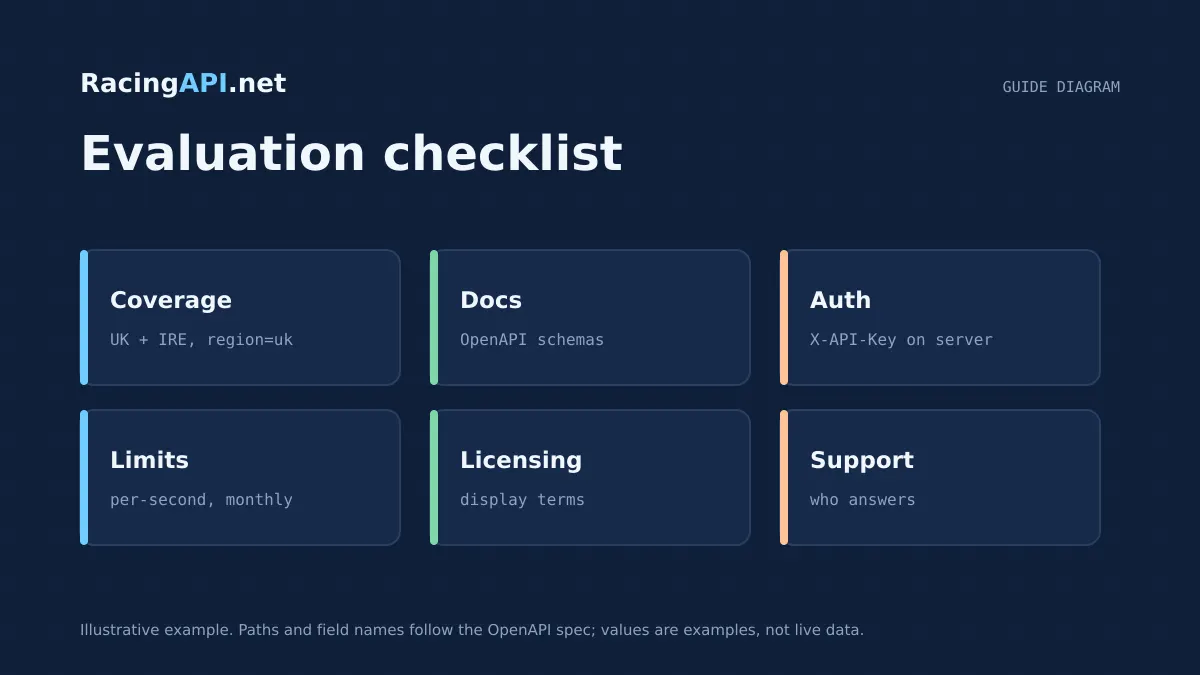
Choosing a horse racing API is less about headline claims and more about whether the feed matches your product, your region, and your integration budget. A sensible purchase decision starts with geography, because the wrong regional model creates avoidable mapping work, inconsistent race IDs, and gaps in historical reporting. It then moves to authentication, sample data, schema quality, and whether the provider’s update cadence suits how your app actually behaves.
If your use case is UK and Irish racing, RacingAPI.net is designed around the combined region=uk feed, with declared runners, results, odds, horse form, connections, course details, and forecast weather available where present. The right choice is the one that gives you enough structure to ship quickly without promising more history, more bookmakers, or more certainty than the feed can honestly support.
Try the documented request
Start with the combined UK and Ireland racecards. Reuse returned IDs and the selected feed date for related race, result, odds and runner requests.
# Set RACINGAPI_KEY on your server; use IDs returned by the feed.
# FEED_DATE must be YYYY-MM-DD in the feed context you want.
curl --fail-with-body --max-time 15 --get \
  "https://racingapi.net/v1/racecards" \
  -H "X-API-Key: ${RACINGAPI_KEY}" \
  --data-urlencode "region=uk" \
  --data-urlencode "date=${FEED_DATE}" \
  -H "Accept: application/json"
Run this on your server, not in public browser code. Replace the environment variables before running it. Respect the response cache headers and Retry-After; do not retry failed requests without a limit.
1. Start with geography, not feature lists
The first filter is whether the API actually covers the races you need. A feed can look comprehensive on paper but still force awkward workarounds if it splits neighbouring markets into separate products or hides part of the coverage behind different region codes. For a live racing app, your country model determines how you search, cache, normalise and display meetings.
RacingAPI.net keeps UK and Ireland together in region=uk, which reduces implementation friction when your product needs both countries in one interface. That matters because you can fetch cards, results and related race data from one regional concept rather than maintaining separate logic for two parallel feeds. The trade-off is clear and honest: this is a combined UK and Irish service, not a global racing database.
When you compare providers, confirm whether the region you plan to request is the same region your users expect to browse. Also check whether historical depth is guaranteed or only partially available. A provider that is transparent about what is in the daily feed, and what is not a full career archive, will usually save you more engineering time than one that overstates coverage.
- Check whether UK and Ireland are unified or separated in the request model.
- Confirm whether historical coverage is complete or limited to feed availability.
- Verify that the same region supports cards, results and related detail endpoints.
2. Insist on authenticated samples before you buy
A published endpoint name is not enough. You need to see how the API behaves with real authentication, real headers, and real response examples before you commit integration time. If a service only shows generic documentation but not practical sample output, you cannot judge whether your parser, caching rules or retry logic will hold up.
RacingAPI.net uses customer API keys sent with the X-API-Key header to https://racingapi.net, with the key kept server side. That setup is straightforward to integrate and easy to rotate when needed. It also means your sample requests should reflect the same authentication path you will use in production, rather than an imaginary sandbox flow that behaves differently from the live feed.
The right test is simple: can you make a real request, inspect the response shape, and decide whether the fields are enough for your UI and analytics layer? For example, racecards return core meeting and runner fields, results provide finishing positions and related details, and horse or connection endpoints expose feed-scoped information that can be joined to your own models.
- Use the same header and base URL you will use in production.
- Test a real card, result and horse lookup, not just a single demo endpoint.
- Confirm that your keys remain server side and can be rotated safely.
3. Treat schema design as an integration cost
A horse racing API is easier to buy than to maintain. The schema is where maintenance costs appear: field names change, identifiers are inconsistent, nested objects become harder to cache, and the meaning of a value is unclear. If you are choosing well, the schema should let you answer three questions quickly: what is this object, how do I join it, and what part of the feed does it belong to?
RacingAPI.net publishes endpoint-specific field sets, which helps you plan joins before you write code. For example, racecards expose meeting and runner information, results expose race outcomes, horse profiles expose runner details and form data available in the selected daily feed, and connections endpoints are limited to the same daily feed context rather than pretending to be a complete career history.
That distinction matters because many racing products fail when developers assume a feed is a full historical dataset. If your application needs daily declared runners, current form and named connections, the schema is enough. If you need a permanent archive, you should budget for your own storage, normalisation and backfill logic from the first day.
- Look for stable IDs on races, horses, courses and results.
- Check whether each endpoint states its scope clearly.
- Plan your own storage if you need long-term history beyond the daily feed.
4. Judge freshness by use case, not slogans
Freshness is often marketed as if every consumer needs the same thing. In practice, a form builder, live race dashboard and post-race results service all need different timings. You should ask how the provider separates source cadence from network response time, whether prices are preserved exactly as observed, and whether the feed makes any promise it cannot genuinely keep.
RacingAPI.net does not claim a universal millisecond update interval or an uptime SLA. Instead, it supplies the data it has in the relevant feed, including live UK odds where present, results when available, and forecast weather on every plan from the course location forecast source. That is a more realistic basis for product design because you can cache, poll and display based on actual endpoint behaviour rather than marketing language.
For weather, the distinction is especially important. The weather endpoint is a forecast from MET Norway, separate from official going. You should preserve the returned attribution, expiry and licence information, and you should treat it as a course-location input for your UI rather than a replacement for racegoing or stewarding data.
- Use the provider’s stated feed scope instead of assuming real-time perfection.
- Preserve source price strings and timestamps where they are returned.
- Keep weather forecasts distinct from official going in your application logic.
5. Check permissions before you architect features
The cheapest integration is the one you are allowed to use as intended. Before you commit to a vendor, verify what activation state is required, whether a trial is card-required, and whether free access is permanent or temporary. If the provider requires explicit access approval, your onboarding process must account for that rather than assuming instant availability.
RacingAPI.net requires either an active subscription, a confirmed seven-day trial checkout, or explicit administrator-approved access. There is no permanent free tier. That matters for product planning because you should not build customer onboarding around a feature you cannot lawfully or technically access until checkout is complete.
It is also important to check plan boundaries. Developer, Professional and Enterprise differ not only in request volume but in rate limits and feature access. Enterprise is the only plan that includes live support, the MCP server for compatible AI clients, and live AI-assisted tips. If those functions are in your roadmap, factor them into your purchase decision up front.
- Confirm whether access depends on checkout, not signup alone.
- Map your roadmap to the plan that actually unlocks the endpoints you need.
- Do not assume one plan’s features carry over to every other tier.
6. Calculate total integration cost, not just subscription price
A good buying decision includes the time you will spend building around the API, not only the monthly fee. Two feeds with the same headline price can differ sharply in parser complexity, pagination behaviour, authentication, rate limits and the amount of post-processing you need to do yourself. The right question is: how many engineering hours will this save or create over the next quarter?
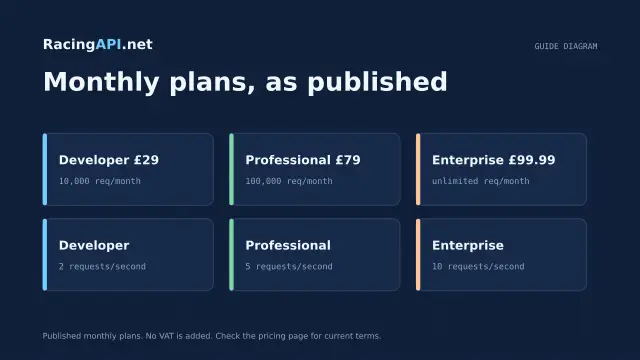
RacingAPI.net keeps pricing and limits simple enough to model early. Developer is £29 for 10,000 requests per calendar month at 2 requests per second. Professional is £79 for 100,000 requests per calendar month at 5 requests per second. Enterprise is £99.99 for unlimited monthly requests at 10 requests per second, plus live support, MCP access and live AI-assisted tips. Monthly usage resets in UTC and is aggregated across keys, so teams should plan shared consumption carefully.
You should also include compliance and operational cost. Customer keys remain server side, API resale and account sharing are not allowed, and weather attribution must be retained where returned. Those constraints are normal parts of production software, but they still belong in the procurement decision because they affect your internal governance, not just your code.
- Model request volume against calendar-month quotas in UTC.
- Include rate limits, support needs and team access rules in your budget.
- Choose the plan that matches both traffic and product scope, not just price.
Key takeaways
- Choose by geography first: for UK and Ireland, RacingAPI.net uses one combined region=uk feed.
- Use authenticated samples to confirm real field shapes, header requirements and access behaviour before buying.
- Build the total cost model around schema work, rate limits, quota resets and your own compliance needs, not just the monthly fee.
Integration checklist
0/10 completeFrequently asked questions
What is the most important first check when comparing horse racing APIs?
Start with coverage geography. If the provider does not match the region your app needs, everything else becomes harder: joins, search, caching and user navigation. For UK and Ireland, RacingAPI.net uses region=uk for both countries, which keeps the integration model simple.
Why are authenticated samples more useful than a public demo?
Because they show the real request path, field shape and access behaviour you will use in production. RacingAPI.net expects an X-API-Key header against https://racingapi.net, so you can validate the same flow before you commit to a build.
How should I think about freshness when I am buying an API?
Judge it by product need, not by slogans. Live odds, results, cards and weather all have different timing requirements. RacingAPI.net preserves observed price strings, provides forecast weather separately from official going, and does not claim an artificial universal update interval.
What hidden costs should I include in my evaluation?
Include schema mapping, storage for your own history, rate-limit handling, key management and any team access rules. RacingAPI.net also resets monthly usage in UTC and aggregates consumption across keys, so your internal governance should reflect shared usage from the start.
Why would RacingAPI.net be a good fit for UK and Ireland?
Because it is built around the combined UK and Irish feed, covers racecards, results, horses, connections, courses and weather where present, and keeps the plan structure straightforward. That makes it a practical choice when your product needs both countries without unnecessary regional complexity.
Related guides
All guides Getting started
Free horse racing API: what developers should know
Learn how RacingAPI.net’s seven-day card-required trial works, what “free” really means, and how to judge an integration before your monthly plan renews.
 Getting started
Horse racing API pricing: choosing your monthly plan
Compare RacingAPI.net monthly plans by request volume and rate limits, and choose the right tier for racecards, results, odds and Enterprise tips.
 Getting started
What is a horse racing API?
A beginner’s guide to horse racing APIs: requests, authentication, JSON responses, racing hierarchy, and how RacingAPI.net fits into a website journey.