Horse Form Statistics API
Add horse form summary panels to betting, editorial and racing workflows with declaration-aware feed context.
Endpoint
GET/v1/horses/{id}/form
- Access
- All plans
- Coverage
- UK and Ireland
- Updated
- 1 Nov 2026
- Read
- 7 min
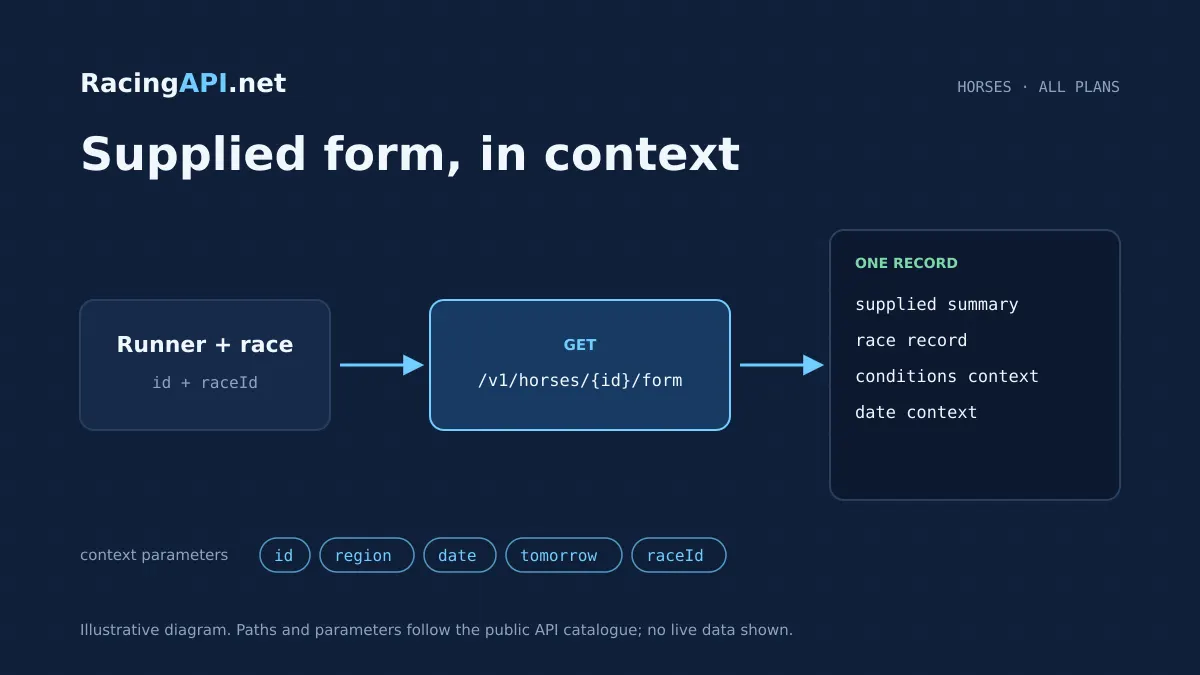
The Horse Form Statistics API gives you horse-specific summary statistics exactly as they are supplied in the selected daily feed, with UK and Ireland combined under region=uk. It is designed for products that need a clear, structured view of a runner’s form context without pretending to be a complete career archive. You can surface grouped form rows for race record, conditions, headgear, class rating and connections where present, then present those figures alongside racecards, price views or internal research tools.
Because the feed is declaration-aware, raceId matters. If you select a raceId, you retain the declaration-specific conditions attached to that horse in that feed; if you do not, the first declaration in feed order is selected and that choice is identified in the response. That makes the endpoint useful for applications that need the right version of a horse’s form on a busy day with multiple runs, while still keeping the integration straightforward: find the horse ID from the same daily feed, call the endpoint, and display the supplied rows as provided.
This is a summary statistics service, not a verified race-by-race past performances database and not a full career-history archive. The response is built around the rows that are available in the selected feed, so a declared horse can return form: [] when no form is supplied. Missing values are empty strings rather than zero, which matters if you are calculating your own presentation logic or blending feed data with other sections of your site.
The API is useful where your product needs context, not guesswork. You can show the horse’s supplied record in a panel beside racecards, enrich a detail page with condition-related summaries, or give analysts a quick way to compare declarations without crawling multiple pages. IDs come from the feed, not name matching, which helps you keep the record linked to the exact horse resource in the exact daily context you selected.
What this service gives you
- Declaration-aware horse form context for clean UI display
- Simple feed-driven integration using horse IDs and raceId
- Works across UK and Ireland within region=uk
What this endpoint returns
The endpoint returns every supplied summary form row for a horse, grouped by section. In practical terms, that means a clean, machine-readable view of the horse’s race record context and the condition-based panels that are present in the selected feed. If the feed includes headgear, class rating or connections data for that declaration, those rows are included; if they are not supplied, they are simply absent rather than inferred.
That distinction is important when you are building a commercial interface. You are not getting a fabricated “best form” narrative or a hidden computed ranking from historic results; you are getting the feed’s own supplied summary layers. This makes the endpoint suitable for display, filtering and internal comparison, particularly when you need consistent panels across racecards, horse pages and form tabs.
- Grouped summary rows by section, where present
- Declared horse context from the selected daily feed
- Empty strings for missing values, not zero placeholders
Horse ID, raceId and daily feed selection
The horse ID is opaque and should be copied from the corresponding field in the selected daily feed. Do not try to recreate it from the horse name, because IDs come from the feed and are the only reliable way to address the resource. If you are building a racecard or horse-search workflow, the usual pattern is to capture the ID from the list view and pass it straight into this endpoint.
The raceId parameter keeps the form view tied to the correct declaration. That matters because the same horse can be declared in different contexts within the same feed, and this endpoint respects that structure. If you include raceId and it does not match one of the horse’s declarations, the request returns 404. If you omit it, the first declaration in feed order is used and identified, which is useful for default display but should be explicit in your UI copy.
- Use feed-supplied horse IDs, not name matching
- raceId preserves declaration-specific conditions
- Omitting raceId selects the first declaration in feed order
How to integrate it into a product
A straightforward implementation usually starts with a horse list or racecard endpoint, then links each runner to this form endpoint on demand. For example, you can add a “Form statistics” tab on a horse page, a hover panel in a racecard, or a side-by-side comparison for analysts. Because the endpoint is read-only and part of the same daily feed model, it fits naturally into a front end that already knows the horse ID and the active feed date.
You can also make the date choice visible to users. The contract supports either a specific YYYY-MM-DD date or the documented tomorrow feed, but not both at once. That lets your application keep a clear “today / selected date / tomorrow” selector while staying aligned with the feed’s own context. If your interface is used for editorial review or pre-race preparation, that date awareness can be shown as a badge or filter state rather than hidden in the query string.
- Start from racecards or horse search, then request the horse form view
- Offer a date selector or tomorrow feed toggle in the UI
- Keep the form panel separate from race results or full histories
Ready to call /v1/horses/{id}/form? All plans, one API key.
What is and is not included
The service is limited to UK and Ireland under region=uk. That combined region is deliberate: Ireland is not a separate code here, and other regional feeds are excluded from customer access for this endpoint. This keeps implementation simple for customers who need one cross-border racing view rather than multiple regional branches, while still preserving the feed structure exactly as delivered.
The data scope is also intentionally narrow. Horse, jockey and trainer profiles are daily-feed context, not universal career databases. Likewise, this endpoint does not convert summary rows into a complete line-by-line run history. If you need race-by-race results, race details or a broader profile view, those are separate products. This endpoint is specifically the supplied form-statistics layer that sits neatly between horse identity and race context.
- UK and Ireland combined under region=uk
- Daily-feed context, not an all-time archive
- Summary statistics only, not a full race-by-race record
Ways customers use the supplied form panels
Commercial users usually place this data where a quick decision or quick read matters. A sportsbook-style dashboard might show the grouped rows beneath the runner name, while a media site might use them as a compact research block under the racecard. Because the endpoint returns the supplied sections as-is, you can preserve the same structure across web, mobile and back-office tools without inventing a new interpretation layer.
You can also use the endpoint to support internal workflows. Traders, editors and racing analysts may want the declaration-specific view in order to compare horses across the same race card or check whether a particular condition-related panel is present in the current feed. Since the endpoint returns missing values as empty strings, your application can keep its layout stable while still allowing for partial data when the feed does not supply every row.
- Racecard side panel or tabbed horse page
- Internal research and declaration comparison
- Consistent layout even when some values are missing
Response behaviour and error handling
A declared horse with no supplied form still returns successfully, but with form: []. That is useful if you want to distinguish between “no form supplied in feed” and a request failure. It also means your code should not assume that every declared runner will have visible summary statistics. Handle the empty array as a valid display state, not an exception.
The endpoint also supports the usual API response controls you would expect from a production feed: 401, 403, 404, 405, 422, 429, 500 and 503 are all part of the contract. In a customer interface, the practical approach is to retry cautiously on transient server responses, surface rate-limit messaging when needed, and present a clear “not available for this declaration” state for 404s that result from a non-matching raceId.
- form: [] is a valid response for a declared horse
- 404 can mean the raceId does not match the declaration
- Treat missing values as empty strings, not numeric zero
Access, plans and account controls
This endpoint is available on all active plans as part of RacingAPI.net’s core REST feeds. The current plan structure is Developer at £29 per month for 10,000 monthly requests at 2 requests per second, Professional at £79 per month for 100,000 requests at 5 requests per second, and Enterprise at £99.99 per month for unlimited monthly requests at 10 requests per second. No VAT is added. Monthly quotas reset on the first UTC calendar day of each month.
New eligible customers can receive one seven-day trial after on-site checkout with a card; sign-up alone does not begin a trial, and the subscription renews automatically unless cancelled. Access is activated after confirmation. Account subscriptions, cards and invoices stay on-site, and keys remain on the customer’s server. Customers may display their own product using the API, but resale, onward API access and account sharing are not permitted.
- Core REST feed access on every active plan
- Monthly quotas reset on the first UTC calendar day
- Keys stay on the customer’s server
Frequently asked questions
How do I get the correct horse ID for this endpoint?
Use the horse ID supplied by the selected daily feed, such as racecards or horse search. The ID is opaque, so you should copy it exactly rather than trying to derive it from the horse name. That keeps the response linked to the correct resource and avoids mismatches when the same horse appears in different feed contexts.
Why should I pass raceId as well as horse ID?
raceId keeps the response tied to the specific declaration in the selected daily feed. If the horse has more than one relevant declaration, this preserves the declaration-specific conditions. If you omit raceId, the first declaration in feed order is used and identified in the response, which is fine for a default view but less explicit for editorial or analytical use.
What does it mean when form is returned as an empty array?
It means the horse is declared, but no form data is supplied for that horse in the selected feed. That is a valid response, not an error. Your interface should show a neutral empty state rather than assuming the request failed or that the horse has no racing history elsewhere.
Is this the same as a full past performances database?
No. This endpoint provides supplied summary statistics and grouped form rows from the selected daily feed. It is not a complete race-by-race archive, and it should not be treated as a universal career-history source. If you need results or race detail, those are separate endpoints with different scopes.
Can I use tomorrow’s feed for previews?
Yes, the contract supports a documented tomorrow feed as a separate option. You cannot combine tomorrow=true with a date parameter, so your UI should treat them as mutually exclusive choices. That makes it easy to offer either a selected historical feed date or a forward-looking preview mode, depending on your product.
Is this endpoint suitable for betting models or prediction output?
It is suitable as an input source for form context, but it does not provide a guaranteed prediction or a fabricated ranking. The endpoint returns the supplied summary form data only. If you are building your own model, you can use the returned rows as features or display context, while keeping your own logic separate from the feed.