Racecourse Details API
Build a racecourse page that combines course identity, daily meetings and the races attached to that course ID.
Endpoint
GET/v1/racecourses/{id}
- Access
- All plans
- Coverage
- UK and Ireland
- Updated
- 1 Nov 2026
- Read
- 7 min
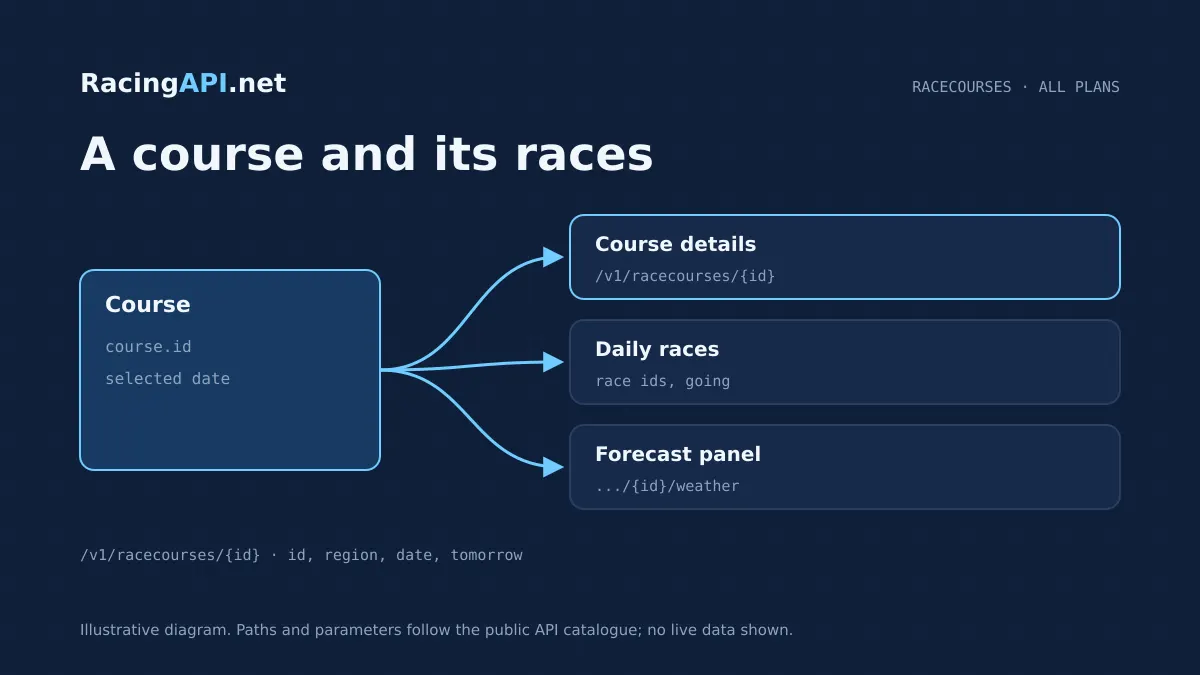
The Racecourse Details API gives you a practical way to turn a course ID from the daily feed into a live racecourse page. It returns the course details for that meeting together with the races linked to the same selected feed, so you can present one place in your product as a clear destination for users. Because the endpoint works from an opaque ID copied from the feed, it is designed for integration rather than name matching, which helps keep your course pages aligned with the source data you have already chosen to display.
This endpoint sits neatly between a course directory and individual racecards. It is useful when you want a racecourse landing page, a venue-focused meeting view, or a navigation layer that groups the day’s races by track. You can combine it with the racecards endpoint for broader daily browsing, with the weather endpoint for a separate forecast panel, and with the results endpoints when the meeting has finished. The service is restricted to the combined UK and Ireland feed through region=uk, and the date or tomorrow selector lets you target the feed context you want rather than relying only on the current day.
What this service gives you
- Turn one course ID into a complete venue page with the day’s matching races.
- Keep official going, weather and race data in separate, clearly labelled panels.
- Build around the selected daily feed so your course views stay aligned with source IDs.
What the Racecourse Details API returns
The endpoint at /v1/racecourses/{id} returns course details for the chosen racecourse together with the races that belong to that course in the selected daily context. That makes it suitable for front ends that need more than a plain directory entry. You can show the venue and the day’s card on one screen, while still keeping the data model anchored to the feed record that supplied the ID in the first place.
The contract is deliberately specific: it gives you a course and its daily races, not a course geometry layer, not a picture archive, and not a historical directory of every meeting ever staged there. That scope is useful because it keeps the response tied to the current feed selection. If your product needs wider browsing, you can pair this endpoint with the racecourse directory feed, but this service is the one to use when the user has already chosen a track and you want to render the matching meeting data.
Use the feed ID, not a name lookup
The path parameter id is an opaque resource ID copied from the matching field in the selected daily feed. It should be treated as a string, and your integration should store it exactly as supplied. This matters because course identity comes from the feed itself, not from a free-text search or an assumption that a venue name will always be enough to locate the right record.
In practice, the best workflow is to take the course ID from the daily feed your app already consumes, then hand that ID to this endpoint when the user opens the racecourse page. That keeps the page consistent with the daily meeting context and avoids inventing cross-feed matches. If you already list courses elsewhere in your application, this endpoint is the detail layer that confirms the course and attaches the day’s races to that same record.
Regional scope and feed date selection
This service accepts region=uk only. That single combined feed includes UK and Irish meetings, so Ireland is not a separate region code in customer access. If your product is region-aware, the simplest setup is to treat uk as the only supported selector for this endpoint and use the course ID from the corresponding daily feed record you have already loaded.
You can also target a particular feed day by passing date in YYYY-MM-DD format, or use tomorrow=true to select the documented tomorrow feed. Those selectors cannot be combined with each other, so your UI should present them as an either-or choice. This is useful when you want to let a user review the next day’s racecourse page in advance, while keeping the data tied to the feed snapshot you asked for.
How teams use it in a live racecourse page
A common use case is a venue landing page that starts with the course name and then shows the daily races underneath. The same response can drive the page header, the race list, and contextual links into each race detail page. If you are building a desktop dashboard, this endpoint can also sit behind a left-hand course navigation panel so users can move from one venue to another without leaving the daily feed context.
For mobile products, the endpoint works well as the payload behind a compact course summary card. You can show the course details first, then fold the meeting races into a list that expands on demand. Because the data arrives from a single course ID, the page can stay focused on one venue rather than forcing the user to scroll through a mixed-day racecard. That makes it a good fit for event-led browsing, meet-specific widgets, and racecourse tabs in a broader racing interface.
Ready to call /v1/racecourses/{id}? All plans, one API key.
Official going and weather should stay separate
One of the most useful ways to present this endpoint is alongside a separate weather panel. The course details response gives you the racecourse context, while the Racecourse Weather API provides MET Norway forecasts with attribution and expiry. That separation matters because weather is not the same thing as official going, and users usually want to see both without assuming they mean the same thing.
If your interface displays course conditions, keep the source labels clear. Official going belongs with the racecourse context returned by the feed, while the weather forecast should be shown as a separate forecast module. This gives your product a better structure: users can review the course, read the daily meeting list, and then consult the forecast panel without mixing a forecast with the official track state. That is especially helpful when the venue page is used as a pre-race planning screen.
What belongs in the course response, and what does not
The endpoint is designed to reflect the daily-feed context. It is not a universal career-history database for horses, jockeys or trainers. If you need deeper biography or form data, those are separate services. Here, the role of the course endpoint is to tell you which races belong to that meeting and to keep the course identity anchored to the feed snapshot you selected.
That same principle applies to other supporting content. Silks are owner colours supplied as PNG images, not portraits, and they should be treated as a visual aid rather than a full profile asset. Odds, if you use them elsewhere in the product, are bookmaker prices supplied as prices, not a guarantee that every bookmaker will be available or that updates happen on a tick-by-tick basis. Keeping each dataset in its own lane makes the venue page easier to maintain and explain.
A practical integration workflow
A clean implementation usually follows four steps. First, load the daily feed and capture the course ID attached to the venue your user has selected. Second, call /v1/racecourses/{id} with the chosen region=uk and, where needed, date or tomorrow. Third, render the course details and the race list in your page or component tree. Fourth, link each race through to the individual race details endpoint when the user wants a deeper view of runners, market data or race-level context.
If your platform uses server-rendered pages, the response can populate the initial HTML for the racecourse view before the user interacts with it. If you are building a client-side app, you can fetch it after the user selects a venue from the daily meeting list. Either way, the important design choice is to keep the course page keyed to the feed ID and to treat this endpoint as the source of the course-plus-meeting view, not as a search engine for venue names.
- Start with the course ID from the selected daily feed record.
- Call the endpoint with region=uk and, if needed, date or tomorrow.
- Render the course summary and the meeting’s races together.
- Use race IDs from the returned races to drill into individual race pages.
Access, plans and operational details
Core REST feeds are available on every active plan, so this endpoint is included in the normal product set rather than being reserved for a separate add-on. The plans are Developer at £29 per month with 10,000 monthly requests and 2 requests per second, Professional at £79 per month with 100,000 monthly requests and 5 requests per second, and Enterprise at £99.99 per month with unlimited monthly requests and 10 requests per second. No VAT is added.
New eligible customers can get one seven-day trial after on-site checkout with a card. Sign-up alone does not begin a trial, and subscriptions renew automatically unless cancelled. Access is automatic after confirmation, while account subscriptions, cards and invoices stay on-site. Monthly quotas reset on the first UTC calendar day of each month. API keys stay on the customer’s server, and the rules allow own-product display but not resale, onward API access or account sharing.
Frequently asked questions
How do I get the correct racecourse ID for this endpoint?
Use the opaque ID from the corresponding field in the selected daily feed. Treat it as a string and store it exactly as returned. The endpoint is not intended for name matching, so the ID from the feed is the reliable way to reach the right course and the matching races for that day.
Does this endpoint return a full historical record of the course?
No. The service is built around the chosen daily feed context, so it returns the course details and the races linked to that selection. It does not imply a historical course directory, full course geometry, or a universal archive of every meeting at that venue. For broader browsing, use the dedicated directory feed alongside it.
Can I use region codes other than uk?
Not for this endpoint. The only accepted value is region=uk, and that combined feed already includes UK and Irish meetings. Ireland is not exposed as a separate region code in customer access, so your integration should treat uk as the single supported regional selector.
What is the difference between date and tomorrow?
Both select a feed context, but they are mutually exclusive. Use date when you want a specific YYYY-MM-DD feed snapshot, and use tomorrow=true when you want the documented tomorrow feed. You should not send both in the same request, and the contract does not guarantee continuous archive completeness.
Should I display weather in the same section as official going?
It is better to keep them separate. Official going belongs with the course context returned by the racecourse data, while the weather forecast comes from the separate Racecourse Weather API and includes its own attribution and expiry. Presenting them as distinct panels avoids confusing a forecast with the official track state.
How does this endpoint fit with race details and racecards?
Think of it as the venue-level page. The Racecourse Details API gives you the course and the races attached to that course in the selected feed. If the user wants deeper information about one race, link through to the race details endpoint. If they want a wider daily browse, use the racecards feed as the broader entry point.