Horse Racing Bookmaker Odds API
Display supplied bookmaker prices for a specific race, grouped by runner and ready for odds comparison or race-day pricing views.
Endpoint
GET/v1/odds/{raceId}
- Access
- All plans
- Coverage
- UK and Ireland
- Updated
- 1 Nov 2026
- Read
- 9 min
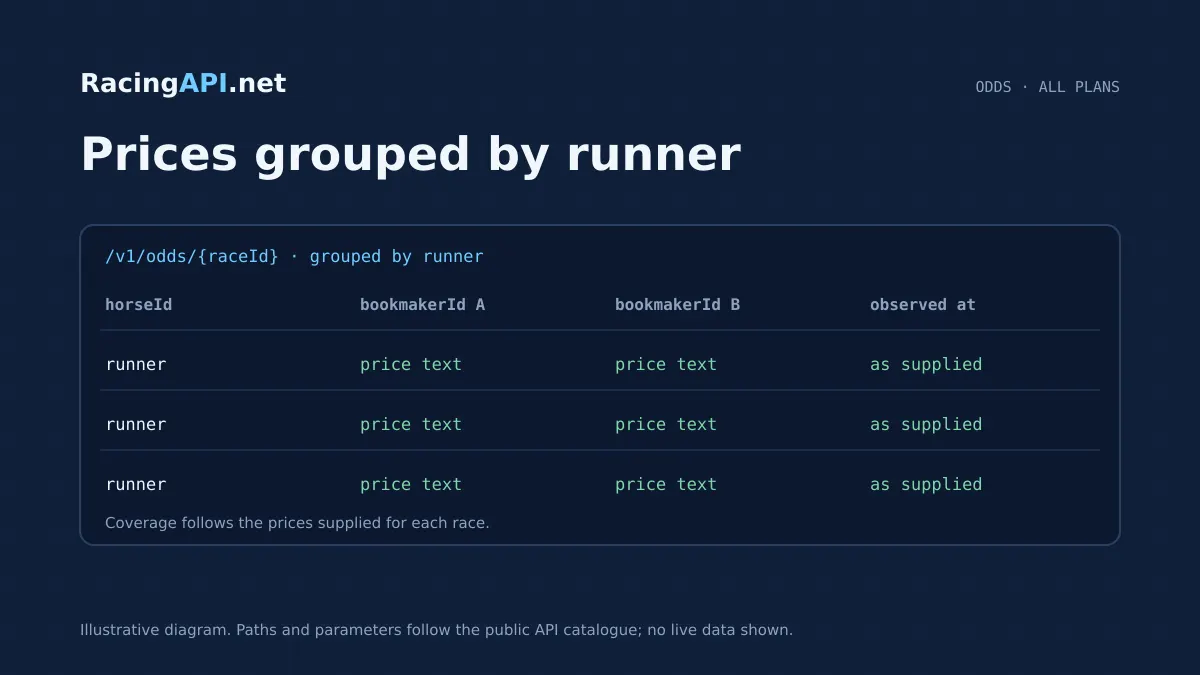
The Horse Racing Bookmaker Odds API gives you the supplied bookmaker prices for one selected race, organised by runner so your product can present a clear price-comparison view without rebuilding the feed yourself. It is a focused race-level endpoint: you pass the race ID for the meeting you already have from racecards or results, and the response returns the bookmakers that were available for that race together with their quoted prices and observation context. Because the feed is based on supplied bookmaker prices, the result is best treated as a live snapshot for display and comparison rather than as a promise that every bookmaker will be present at every moment.
This endpoint sits naturally alongside the rest of RacingAPI.net’s race data products. A common integration pattern is to resolve a race in your racecards or race details view, then fetch odds for that exact race when the user opens the price tab or bookmaker panel. You can use the returned runner groupings to build a compact odds table, an expandable horse card, or a market strip inside a race detail page. The service is designed for the UK and Ireland combined feed, with region=uk as the only accepted region value, and it preserves the source price strings rather than converting them into a different representation.
What this service gives you
- Show supplied bookmaker prices grouped by runner for a selected race.
- Build race-page odds tables and market snapshots from one targeted endpoint.
- Keep your interface grounded in supplied price strings and observation context.
What this endpoint provides
The endpoint returns supplied bookmaker prices for the selected race, grouped by runner. That makes it suitable for an interface where each horse, doggedly kept to the race you have already identified, expands to show the books that priced it. The feed is race-specific rather than name-based, so the raceId should come from the same RacingAPI.net dataset that supplied the racecards or results. That avoids ambiguity when horses share similar names or when a meeting has multiple races on the same card.
Each bookmaker price is delivered as a source value string, and the contract is explicit that these strings preserve the original values without implying a decimal-to-fractional conversion. This matters if your platform shows the bookmaker’s own style of price presentation or stores the feed exactly as received for audit and display. You can still format the response for your front end, but the underlying service should not be treated as a normalised odds calculator.
The endpoint also carries supplied observation context, which lets your interface show when the market snapshot was observed rather than implying a fixed update cycle. That is useful for customers who need to understand that prices may vary between refreshes. Bookmaker availability, each-way terms and price completeness can differ from race to race, so the product should be presented as a comparative display layer, not as a guarantee of a complete market.
How to integrate it cleanly
A simple implementation starts with the race listing or race detail page you already have. When a user opens a race, use the race ID from the same feed and call GET /v1/odds/{raceId}. If your app offers date controls, pass either the date parameter for a specific YYYY-MM-DD feed or tomorrow=true for the documented tomorrow feed, but not both together. The only accepted region value is uk, which covers the combined UK and Ireland meetings feed for this product.
For a user-facing odds panel, most buyers render the response in three layers: runner name at the top, bookmaker rows underneath, and observation time or source context in a subtle metadata line. If the bookmaker list is long, you can sort or group by best available price, by bookmaker ID, or by whether the runner has multiple prices returned. None of that changes the feed itself; it is simply a presentation choice built on top of the supplied data.
If you are building an internal trading or editorial tool, the same endpoint can be used to populate a quick-reference price view beside racecards, form, and results. Because the data is tied to a specific race ID, your application can cache the response for the current page session and refresh it when the user requests an update. The API does not imply tick-by-tick history or exchange-style streaming, so the safest design is a user-initiated refresh control rather than an automatic trading feed.
- Use raceId from racecards, race details or results for the same race.
- Choose either date or tomorrow when selecting the feed context.
- Render bookmaker prices per runner, not as a generic market list.
Display choices for buyer products
For consumer websites, a comparison table is the most obvious use. It lets visitors scan each runner and see which bookmakers supplied prices for that horse in the selected race. Because the feed preserves the bookmaker identifiers and the original price strings, your product can keep the bookmaker branding consistent with the data source without making assumptions about conversion or ranking. A small note can explain that prices are supplied bookmaker quotes and may not be available for every runner or at every refresh.
For mobile apps, a condensed runner card usually works better than a full table. Each card can show the horse name, the best visible supplied price, and a button to expand the full bookmaker list. That keeps the interface readable on small screens while still exposing the detail buyers need. If you also use racecards, the odds panel can sit behind a tab so the user moves from race information to market view without leaving the page.
Editorial or broadcast-facing tools often need a simpler display. In those cases, the endpoint can power a “market snapshot” tile that shows the current supplied prices for the key runners in the race, with an observation time for context. That is especially useful when staff need a fast answer inside a controlled workspace rather than a consumer-facing betting screen. The same endpoint can feed both styles, as long as you decide in your UI how much detail to expose.
Ready to call /v1/odds/{raceId}? All plans, one API key.
Data scope and practical limits
This is a UK and Ireland race feed with region=uk as the single accepted region value. It does not open up other regional datasets, and Ireland is not a separate region code for this service. If your product works across multiple RacingAPI.net endpoints, keep the same region logic throughout the journey so users do not see inconsistent race lists, race IDs or price displays.
The odds feed is built for supplied bookmaker prices, not for exchange trading, universal bookmaker coverage or a historical movement chart. Bookmaker availability can vary, and the contract explicitly notes that each-way terms and price completeness vary as well. That means your product should avoid wording that suggests all runners will always have a full set of prices. Instead, present the data as the market that was supplied for that race at the observed time.
If you want to show a price history, it needs to be your own stored record of repeated API calls, not something implied by the endpoint. The service itself returns the current supplied price snapshot for the selected race and does not promise a built-in movement archive. That makes it straightforward to build a clean live odds view, but you should not describe it as a tick-driven trading feed or a complete bookmaker coverage engine.
Working with race IDs and feed context
The key to a reliable integration is using the correct race ID from RacingAPI.net. The contract says the raceId comes from racecards or results for the same region and date, which means it is not a free-text horse search and not a name-match lookup. That design keeps the odds endpoint tightly connected to a known race and reduces the risk of showing prices for the wrong meeting or the wrong race number.
In practice, most buyers will carry the race ID through their user journey. For example, a racecard page may link each race to a details view, and the odds tab can reuse the same identifier when the user opens bookmaker prices. If you allow date filters, make sure the odds call uses the same day context as the race list, especially when a meeting spans late afternoon and evening sections across the UK and Ireland feed.
Because the feed includes supplied observation context, you can show a small label such as “observed at feed time” or similar wording that stays close to the data. That gives end users a sensible reminder that the prices reflect the current supplied snapshot. It also helps support teams, because they can distinguish between a race with limited bookmaker availability and a race where the user simply refreshed before the next update.
Building a reliable UI around the feed
A strong odds page should make the feed easy to read without pretending it is more complete than it is. Keep bookmaker identifiers visible in an advanced view, but let casual users start with the best available price per runner. If your product serves both hobbyists and analysts, a toggle between “summary” and “all prices” is often enough. The API gives you the runner grouping and bookmaker rows; the interface choice is yours.
You can also use the endpoint to support race comparison pages that sit alongside form, weather and silks. For example, a race detail page can show the race information first, then a weather widget, then the bookmaker prices. That layout works well because the odds feed is one more layer of race context rather than a separate destination. Silks from the related service remain owner colours in PNG form, and weather is a separate forecast feed with its own attribution and expiry.
For client-side handling, the safest pattern is to treat a 404 as “no odds available for this race” rather than as a general system fault, and to handle 422 or 429 as request issues that your application should surface clearly. That keeps the user experience honest. A buyer building an admin tool can also log the supplied response alongside the race ID and selected date to help staff audit what was shown on screen at a given moment.
Plans, access and implementation choices
This core REST feed is available on all active plans, so you do not need an Enterprise subscription just to consume bookmaker odds. The plan choice is mainly about volume and request rate: Developer includes 10,000 monthly requests at 2 requests per second, Professional includes 100,000 at 5 requests per second, and Enterprise includes unlimited monthly requests at 10 requests per second. Monthly quotas reset on the first UTC calendar day of each month.
Access is activated automatically after checkout is confirmed, and new eligible customers can receive one seven-day trial after on-site checkout with a card. Sign-up alone does not begin a trial, and the subscription renews automatically unless it is cancelled. Account subscriptions, cards and invoices stay on-site, while API keys remain on the customer’s server. That makes it straightforward to integrate the odds feed into an existing application without moving operational access outside your own environment.
If you are planning a wider RacingAPI.net build, the odds endpoint usually sits between race identity services and on-screen market presentation. A common stack is: retrieve racecards, open the chosen race, request bookmaker prices, and then display them in a comparison module or odds tab. Because own-product display is allowed but resale, onward API access and account sharing are not, this endpoint is best positioned as part of your product experience rather than as a white-label re-sale layer.
Frequently asked questions
What do I need to call the bookmaker odds endpoint?
You need a raceId from the same RacingAPI.net racecards or results feed, plus the optional feed context if you want a specific day. The contract accepts region=uk, which covers the combined UK and Ireland meetings feed, and you can choose either date or tomorrow=true. The endpoint is designed for a single selected race, not for searching by horse name or pulling a whole meeting in one call.
Can I treat the prices as a complete bookmaker market?
No. The contract says bookmaker availability and price completeness vary, so the feed should be presented as supplied bookmaker prices for that race rather than as guaranteed full coverage. That is ideal for comparison screens, market snapshots and race detail pages, but you should avoid wording that implies every bookmaker is always included.
Does the API give decimal odds, fractional odds, or both?
The response preserves source price strings and does not imply a conversion into another odds format. That means you should display the supplied value as received unless your own interface explicitly adds presentation logic. The service is about returning the bookmaker quote for the race, not about normalising prices into a single mandatory style.
Is this suitable for live trading or tick-by-tick updates?
It is not an exchange stream and it does not promise price-movement history or tick-by-tick refresh. You can refresh the endpoint in your own product when a user asks for an update, but the contract does not position it as a trading platform feed. It is better suited to race-page display, comparison tables and snapshot-based market views.
How do date and tomorrow work with the odds feed?
You can select a specific YYYY-MM-DD feed with date, or use tomorrow=true for the documented tomorrow feed. Those parameters cannot be combined. If your site shows a racecard for a particular day, keep the odds request on the same date context so the race ID and the market snapshot remain aligned.
Can I use this data in my own customer-facing product?
Yes, own-product display is allowed, so you can build consumer pages, internal tools or editorial dashboards around the feed. What is not allowed is resale, onward API access or account sharing. In practice, that means you can show the bookmaker prices inside your product, but you should not pass the API through as a service for other people to resell.